Customizing your Canvas course is a simple way to create a smoother, more intuitive learning experience—for both you and your students. With a few strategic adjustments, you can create a polished, efficient Canvas set-up that gives students a clean, streamlined learning environment.
Personalize Your Home Page
Instructors can choose which page students see first when clicking into their Canvas course, and a well-designed homepage can act as a dashboard for the entire course. Most Ecampus courses have a home page that includes a custom banner with the course code and name as well as links to the modules, Start Here module, and Syllabus page. You might want to add links to external tools or websites your students will use frequently for easy access. You can also pin up to five of the most recent announcements to the home page, which can help students quickly see important information (see “Course Details” below for instructions).
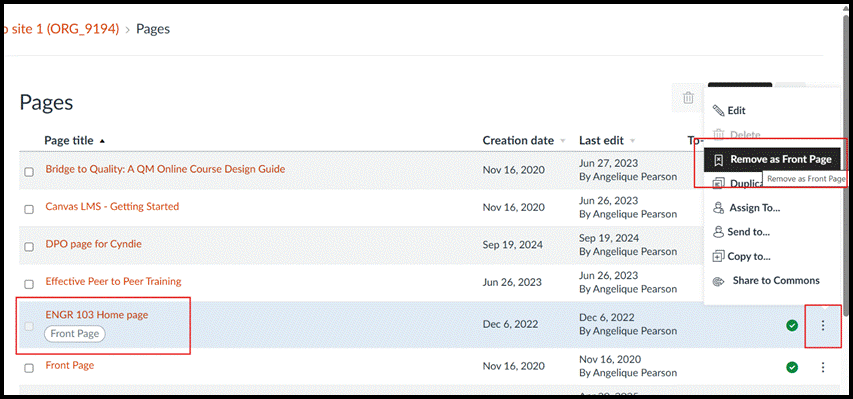
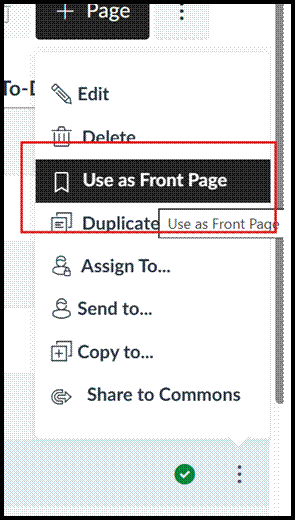
If you want to change which page your course defaults to, click the “pages” tab in the course menu, then click “view all pages”. Your current course home page will appear with the tag “front page”. To change it, click the three dots and choose “remove as front page”. Then choose the three dots menu next to the page you want and you’ll see a new option, “use as front page”.
The Gradebook
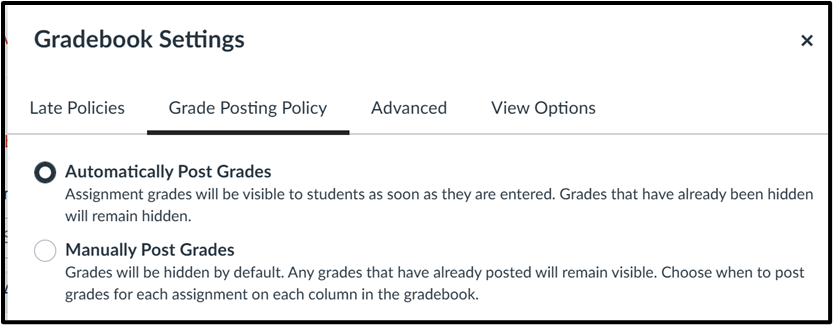
The next area you will want to check is your gradebook, as there are many options you can set to help streamline grading. Click the settings gear icon to pop out the gradebook settings menu. The first option is choosing a default grade or percentage deduction for late assignment submissions. Automating this calculation is extremely helpful for both instructors and students, especially if you want grades to decrease a certain percentage each day.
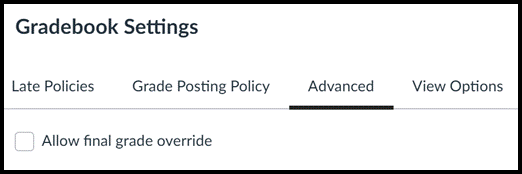
The next tab allows you to choose whether you want grades to be posted automatically or manually as your default setting. The third tab, “advanced”, enables an instructor to manually override the final grades calculated by Canvas.
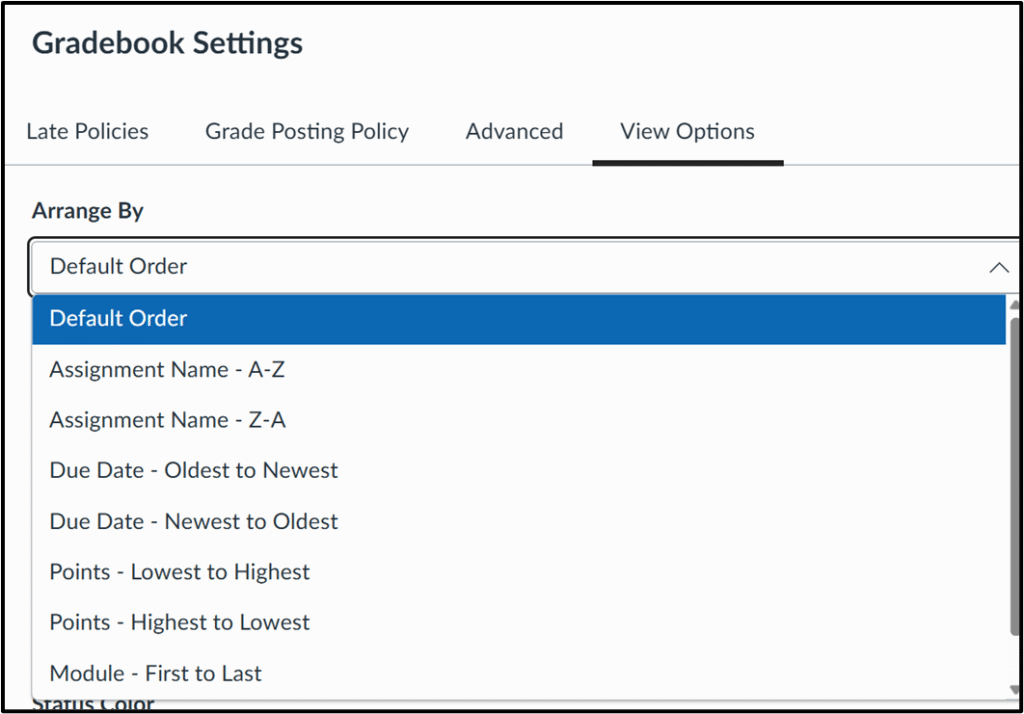
The last tab, “view options”, contains several ways to tweak the appearance of your gradebook. The first option is determining how the gradebook displays assignments, defaulting to the order they appear on the assignments page. You can change that if you prefer to see assignments in one of the other possible arrangements (see image below).
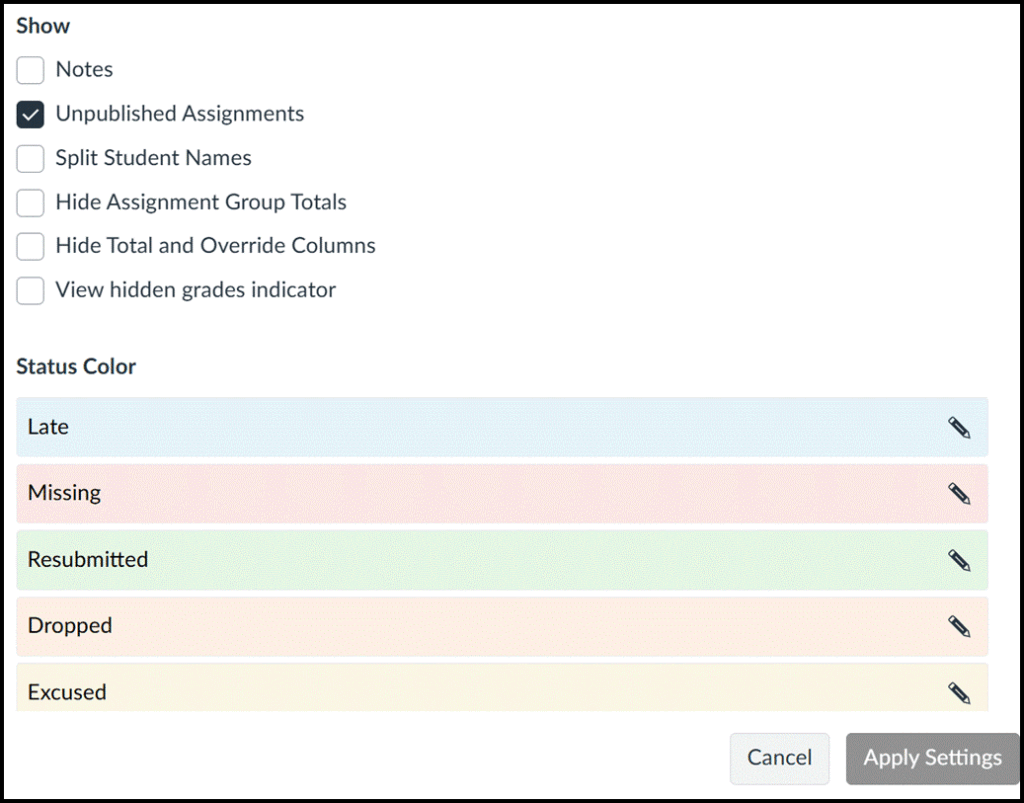
You can choose which columns you want to see when you launch the gradebook, with the option to add a notes column, visible only to instructors, which appears to the right of student names. Many instructors use the notes column as a field where they can track interactions and keep important information about students. You can also change the default gradebook colors that indicate whether a submission was late, missing or excused.
The Settings Tab
The settings tab in your Canvas course is hiding some features you might not know you have access to that allow you to customize your course. Let’s look more closely at three of the sections you’ll see there: course details, navigation, and feature options.
Course Details
There are a few options you can change under the course details section, though it is important to note that there are settings here that you should NOT adjust, including the time zone, participation, start and end dates, language, visibility, and any other setting besides the specific ones described below. These settings are put in place by OSU and should not be changed.
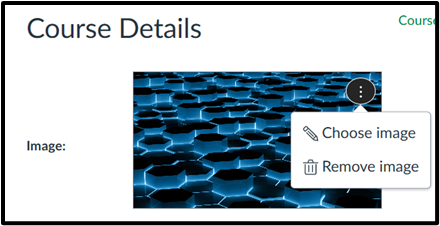
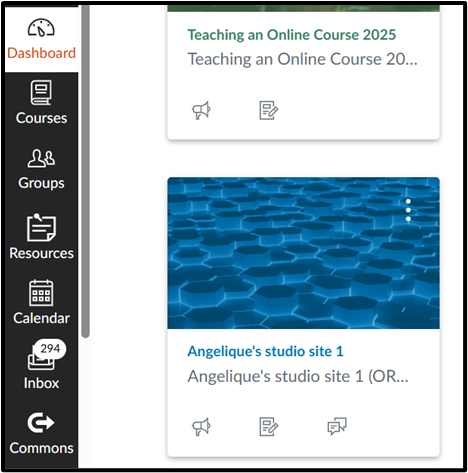
At the top of this section, there is a place to upload or change your course image, which is mirrored on the dashboard view for both you and students. Adding an image here that represents your course content can help students visually find your course quickly on their Canvas dashboard.
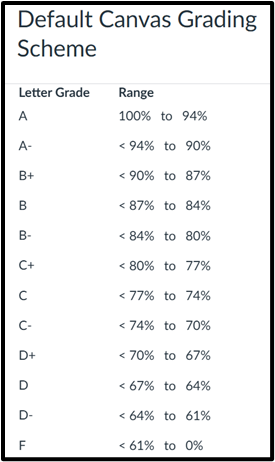
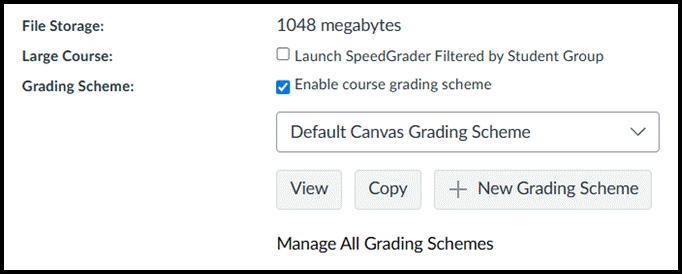
The next section of interest is the grading scheme. Canvas has set a default grading scheme, shown in the chart below, so if the default scheme works, you do not need to adjust it. However, if your department or course syllabus uses different score ranges than the default scheme, you can create your own.
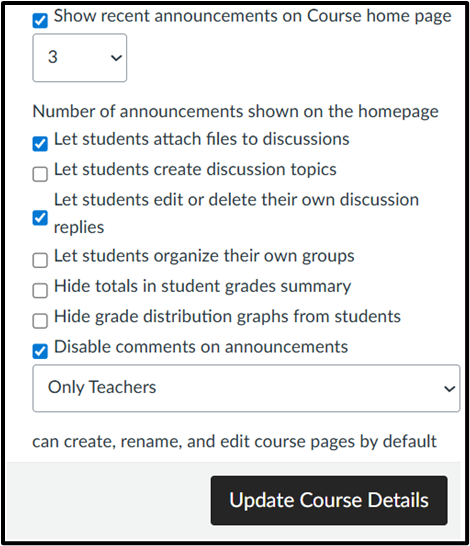
Another area in this section you may want to consider is the bottom set of options, seen in the image below. Here, you have the ability to show up to five most recent announcements to the course homepage, which helps ensure students see important messages when they navigate to your course. Click the checkbox to show recent announcements and choose how many you’d like students to see.
There are some other options here, giving instructors the choice to allow students to create their own discussion boards, edit or delete their discussion replies, or attach files to discussions. There is also the option to allow students to form their own groups. Additionally, instructors can hide totals in the student grade summary, hide the grade distribution graphs from student view, and disable or enable comments on announcements. Be sure to remember to click the “update course details” box when editing course details to save any changes you make.
Navigation
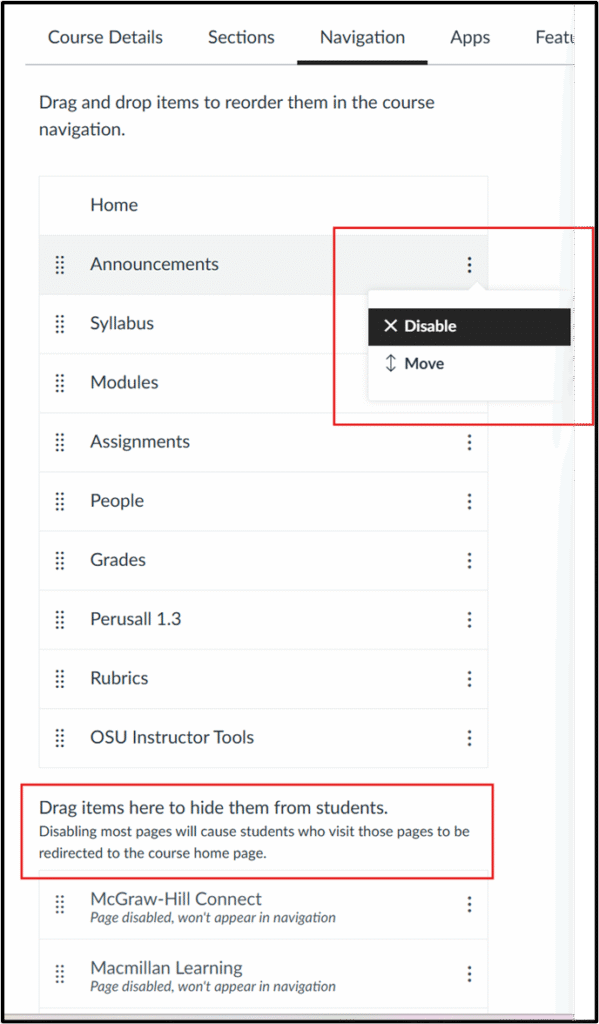
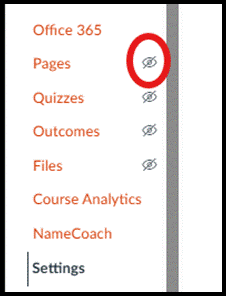
The next section instructors may want to explore is navigation, which controls the Canvas course links that appear in the left-hand menu. This simple interface lets you enable or disable links to customize what links students see in the left-side navigation menu. We recommend checking your course to be sure that the tabs students need are enabled, such as syllabus and assignments, and others such as instructor-only areas like pages and files, are hidden from students. Navigation items including OSU Instructor Tools, Ally Course Accessibility Report, and UDOIT Accessibility never show to students and should be left enabled. You can also enable links to any external tools, like Perusall or Peerceptiv, you may be using in your course.
In your course, disabled links will not be visible to students, marked with the crossed-out eye icon denoting that they are hidden, but you will still see them. To enable/disable a menu item, use the three dots menu or simply grab and drag menu items to the top (enabled) or bottom (disabled) section, and remember to click save at the bottom of the screen. You will immediately be able to see a change in your course menu.
Feature Options
The final section you might want to explore is Feature Options, which lists features that you can turn on or off. This usually includes previews of features that Instructure is beta testing. Clicking the arrow icon next to each shows a brief description of the option. You’ll see disabled features marked with a red X, while enabled ones are marked with a green checkmark- you can toggle these on and off with a click.
Some features you might be interested in testing out include the following:
Assignment enhancements (improves the assignment interface and submission workflow for students)
Enhanced rubrics (a new, more robust tool for creating and managing rubrics)
Smart search (uses AI to improve searchability within a course; currently searches content pages, announcements, discussion prompts and assignment descriptions)
Submission stickers (a fun one you can add if you enable assignment enhancement)
While these may seem like small changes individually, customizing the look and feel of your Canvas course can have a big effect on your students’ learning experience. Contact Ecampus faculty support if you have any questions or need assistance personalizing your course.
The saying “students may forget what we teach, but they’ll remember how we made them feel” is such an important idea that could help us start thinking about how to make online learning a space that fosters belonging, connection, respect for individual differences, and authentic participation. In support of instructional design practices and teaching approaches that can accomplish these aspects, online course design and teaching can be transformative for students (and instructors) when more human-centered strategies are built into the courses, strategies that go beyond cognitive tasks and challenges, and attend to the well-being of students and instructors. What if these practices and approaches are built upon kindness? Cate Denial’s (2024) “A Pedagogy of Kindness” invites us to explore ways in which we can do that.
In this first blog, I will share the foundational notion of “A Pedagogy of Kindness” and its main components. I will also offer a brief example to illustrate a step in applying this kind of pedagogy in an online course.
Denial’s View of Academia and Teaching
In the book, Denial shares her own journey through academia, as a first-generation student and as an academic navigating the intricacies of higher education in the U.S. At the same time, Denial is critical of the culture of higher education that poses many challenges to all to be more caring and kinder to themselves and each other. Through accounts of her own experience as an undergraduate, graduate, and academic in higher education, Denial argues that academia socializes individuals into a culture of power dynamics that emphasizes competition, the pursuit of individual excellence, ableism, and exclusion. This socialization made Denial question the vision, perceptions, and warnings about students: they cheat, won’t do their assignments, want easy ways to pass a course, challenge professors, and should be under suspicion all the time. However, through a process of reflective practice and being asked to defend pedagogical choices, Denial realized she could not defend the indefensible. The choice was clear: why not be kind to students and, through kindness, make a difference in their lives and their educational journeys?
Kindness and Pedagogy
But what does kindness have to do with pedagogy and with online teaching and learning? The short answer is “everything.” Kindness helps to direct our attention, actions, and thoughts to being compassionate and considerate to those around us, physically and virtually. But what is kindness in the first place? Denial defines it in terms of what it is not: It is not about being nice because being nice is hypocritical, underscores power imbalances, presupposes a traditional view of rigor, and leads to burnout—all because of the efforts to disguise actions and thoughts as pleasant when they are less so. Kindness, instead, is a more genuine way to care for others—an approach that makes all see opportunities to bring equity, embrace accountability for our actions and thoughts, and remind ourselves that we live and thrive through compassion even in darker times.
Pedagogy of Kindness Framework
In the Pedagogy of Kindness framework, Denial presents three intersecting elements: a vision for justice, believing students, and believing in students. And these three elements point to considering students’ personal responsibilities, work commitments, financial obligations, disabilities, and attitudes toward the world around them (e.g., politics, climate change), and meet them where they are. In addition, Denial posits that “[w]e must take a hard look at what we’re asking students to do and then identify if there is value in it….If there is, we need to be able to explain that value to students as clearly and directly as we can.” (p 17) Denial’s framework for a pedagogy of kindness rests on three intersecting principles:
Justice: In this element, we should consider:
Who our students are
Give students the benefit of the doubt when something outlandish occurs
Believe in what students share about their educational experiences
Believe Students:
Cultivate trust
Be ready to deal with a situation or crisis rather than putting all under suspicion
Discuss with students ethical decisions
Believe in Students:
Students want to learn—they have creativity, capacity, and thoughtfulness
Establish collaboration for mutual learning
Pedagogy of Kindness in Online Education
This framework can be integrated into a course in multiple ways, through the teaching approach, syllabus, class practices, and overall interactions with students. For instance, in one online course I helped design, the language in the Artificial Intelligence policy said something to the effect of “If the assignment is written with AI, you will receive a zero.” In order to cultivate trust and help the instructor prepare to deal with any academic misconduct, we revisited the description of the policy, highlighting the value of students’ own work, ideas, and reflections. The policy language also acknowledged the challenges in completing the assignment and reinforced the importance of the learning process more than the product of the assignment. This example speaks to the believe students and believe in students elements of the pedagogy of kindness.
Now, how might you make kindness visible in your own online teaching?
A second part of this blog will provide examples and practical ways of how Pedagogy of Kindness grounded the design and facilitation of online courses.
Many educators are grappling with questions about AI detection. Yet, AI detection tools are unreliable, biased, and distressing. False positives can harm students’ academic standing and well-being, with marginalized groups often disproportionately affected, while detectors still miss significant portions of AI-generated text (Lurye, 2025; Encouraging Academic Integrity, 2025; Hirsch, 2024). And detection tools assume students simply copy and paste AI outputs, when in reality many use these tools more fluidly–taking suggestions, rewriting, or iterating through prompts–making their work indistinguishable from original writing. As one student noted, “it’s very easy to use AI to do the lion’s share of the thinking while still submitting work that looks like your own…” (Terry, 2023).
What Students Want
Most students believe institutions should address academic integrity concerns related to generative AI, but they largely prefer proactive and educational approaches over punitive measures. A significant number of students want clear rules about when and how AI tools can be used, as well as a voice in shaping them (Flaherty, 2025).
From Policing to Partnership
Given the inherent risks of detection and bans — tools that can unfairly penalize students and policies that do little to promote ethical use — the better path forward is not more surveillance, but more collaboration. Faculty-written policies risk missing the mark if they ignore how students actually engage with AI. Instead of policing AI through punitive measures, faculty can create space for students to help define appropriate guidelines. Policies crafted together shift the dynamic from rules imposed to standards co-owned, building trust and relevance.
Why Co-Creation Works
Self-Determination Theory suggests that students are more likely to internalize and adhere to guidelines when they have a hand in creating them. Involving students in developing AI usage policies communicates that their perspectives are valued and supports their need for autonomy, turning compliance into genuine commitment. Co-created rules feel less like authoritarian decrees and more like shared standards, which in turn fosters ownership, clarity, and consistency in how those policies are understood and followed (Guay, 2022; Kuo et al., 2025).
Practical Approaches to Co-Create AI Policies
Research makes it clear: students are more likely to respect and follow policies they help shape. But theory alone won’t change your syllabus. The real shift happens when faculty move from principle to practice. The good news? There are straightforward, adaptable activities you can use right now to bring students into the conversation and co-create meaningful AI usage policies. For best results, implement these activities within the first week or two of the term, or before your first major assignment.
Document-Based Collaboration
1. Shared Policy Google Doc
A structured Google Doc provides policy headings (Assessment, Collaboration, Academic Integrity). Students co-edit the text under each section, adding suggestions in comments. As comments are resolved, the document evolves into a finalized class-wide AI usage policy.
Students use a wiki page to respond to realistic AI-use scenarios (e.g., “AI writing feedback on essays”). Small groups draft responses for each scenario, and peers edit for consistency. Over time, pages become a collective guide to what counts as acceptable AI use, directly forming a policy.
Tool: Canvas Wiki Pages (or equivalent LMS wiki feature)
3. Crowd-Sourced Glossary
Students collaboratively define AI-related terms and practices in a shared glossary tool (wiki or Google Doc). Each entry includes “permitted uses” and “restricted uses.” The glossary doubles as both a vocabulary aid and a concrete class AI policy.
Using a template, students co-author a charter with structured sections: Purpose, Guidelines, Responsibilities, and Consequences. Each section is drafted collaboratively, with rotating editors refining language. The final product is a polished class AI usage charter.
Instructor seeds a discussion with prompts for different policy areas. Students propose clauses and debate wording in threads. A moderator (instructor or rotating student role) synthesizes the top ideas into a consensus policy posted back to the group.
Tool: Canvas Discussions
6. Draft & Vote Forum
The instructor posts draft clauses in a forum. Students propose alternatives as replies. A class-wide vote (via Canvas poll or Google Form) determines the preferred wording. The winning clauses are compiled into the final AI policy.\
Students write sequential short blog posts on a shared course blog. Each post revises or critiques the prior entry, building momentum toward consensus. The chain of posts is later synthesized into a cohesive AI usage policy.
On a Miro board, students build a shared mind map with branches like “Learning Support,” “Integrity,” and “Assessment.” They attach notes or examples under each branch. The class then translates the map’s structure into a written, shared policy document.
An instructor uploads an external AI policy (e.g., from a university or journal) into Perusall. Students highlight passages and comment on what they agree with or want to adapt. Annotations are collected and distilled into a tailored class policy.
Students record short reflections (video or audio) on what should or shouldn’t be in the AI policy. Using Kaltura in Canvas, Microsoft Teams, or Canvas Discussions with media replies, they share contributions and respond to peers. The instructor (or a student group) compiles clips and/or transcripts into a single artifact. This collective media product is then distilled into draft clauses for the shared AI usage policy.
The instructor creates a Qualtrics survey with items such as: “Is it acceptable to use AI to generate code for an assignment?” Students select Acceptable, Unacceptable, or Conditional and provide a brief rationale. Qualtrics automatically aggregates results into tables and charts, making consensus and disagreements easy to spot. The class then uses these visual summaries to draft clear, evidence-based clauses for the shared AI usage policy.
Each student drafts a mini-policy document and submits it to a shared folder or assignment space. Using a structured rubric, peers review at least two classmates’ drafts, either through Peerceptiv or LMS assignment tools. The strongest and most frequently endorsed ideas are integrated into a composite class policy authored by the group.
Once students have contributed through these activities, the instructor’s role is to bring the pieces together. Compiling the results, highlighting areas of consensus, and drafting a clear, shareable policy ensures that the final guidelines reflect the class’s input. Sharing this draft back with students not only closes the loop but also reinforces that their voices shaped the outcome.
Before you drop a boilerplate AI statement in your syllabus, try one of these toolkit activities. Start small–maybe a survey or a media roundtable–and see how co-writing changes the game.
References
Encouraging academic integrity – University Center for Teaching and Learning. (2025). University of Pittsburgh. https://teaching.pitt.edu/resources/encouraging-academic-integrity/
Flaherty, C. (2025, August 29). How AI is changing—not ‘killing’—college. Inside Higher Ed. https://www.insidehighered.com/news/students/academics/2025/08/29/survey-college-students-views-ai
Guay, F. (2022). Applying self-determination theory to education: Regulations types, psychological needs, and autonomy supporting behaviors. Canadian Journal of School Psychology, 37(1), 75–92. https://doi.org/10.1177/08295735211055355
Hirsch, A. (2024, December 12). AI detectors: An ethical minefield. Center for Innovative Teaching and Learning. https://citl.news.niu.edu/2024/12/12/ai-detectors-an-ethical-minefield/
Kuo, T.-S., Chen, Q. Z., Zhang, A. X., Hsieh, J., Zhu, H., & Holstein, K. (2025). PolicyCraft: Supporting collaborative and participatory policy design through case-grounded deliberation. In Proceedings of the 2025 CHI Conference on Human Factors in Computing Systems (pp. 1–24). Association for Computing Machinery. https://doi.org/10.1145/3706598.3713865
Lurye, S. (2025, August 7). Students have been called to the office — and even arrested — for AI surveillance false alarms. AP News. https://apnews.com/article/ai-school-surveillance-gaggle-goguardian-bark-8c531cde8f9aee0b1ef06cfce109724a
Terry, O. K. (2023, May 12). Opinion | I’m a student. You have no idea how much we’re using ChatGPT. The Chronicle of Higher Education. https://www.chronicle.com/article/im-a-student-you-have-no-idea-how-much-were-using-chatgpt

Special Edition: Guest Blog by Assistant Professor of Practice (Urban Forestry), Jennifer Killian
When I was asked to create a new course for Oregon State University’s Ecampus program, my first reaction was a mix of sheer excitement… and, well, a little terror. I’ve built workshops, presentations, and even all-day trainings, but assembling ten weeks of graduate-level content from scratch? That felt like wandering through a haunted house to me. Dark, empty, and full of unknowns. Adding to the surrealness, I realized that thirteen years ago, I was a graduate student here, taking several Ecampus courses myself including an early version of the very class I would now be teaching. The idea that I could bring my professional experience back to this institution and shape this course? Thrilling, humbling… and a yes, definitely a little spooky.
The course, FES 454/554: Forestry in the Wildland-Urban Interface, explores the complex challenges of managing forests where communities and wildlands meet. Students dive into forest health, urban forestry, land-use planning, wildfire, and natural resource management through social, ecological, economic, and political lenses. It’s a “slash course,” meaning both undergraduates and graduate students can enroll so I knew the content needed to speak to a broad spectrum of learners. And I had to build it all from the ground up.
Enter the magical world of Ecampus Instructional Design. My Instructional Design partner was way more than support. To me, she was a friendly ghost guiding me through every room of this haunted course house. There were moments when I was convinced I had hit a dead-end, only to have a creative solution appear almost instantly. From turning complex assignments into clear, engaging experiences to keeping me on track and motivated, the team transformed my raw ideas into a cohesive, polished course. I honestly cannot say enough about the skill, creativity, and dedication they bring to the table.
One lesson I carried from my own hiking adventures literally proved invaluable during the course build. Years ago, I was struggling up a 14,000-foot peak in Colorado, staring at the distant summit, more than ready to quit. My hiking buddy simply said, “Don’t look at the summit. Pick a rock a few feet ahead and walk to that. Then take a break, and pick another rock.” That became my metaphor for course development. Instead of being paralyzed by the enormity of a ten-week course, I focused on the next “rock.” Some of my rocks included simply finishing the syllabus, creating the first assignment, securing a guest lecture, or finding a key reading. By breaking the work into manageable pieces, the haunted hallways of that blank course shell became far less intimidating and actually surprisingly rewarding.
Another highlight of building this course was connecting students with the people shaping forestry in the field. Reaching out to industry professionals for guest lectures and insights brought this material to life and grounded it in examples. It also reminded me how much real-world perspectives enrich student learning. Two colleagues from my department contributed individual weeks of material, which helped broaden the course and gave students a chance to see the WUI topic through multiple professional lenses. I was grateful for their contributions too! Seeing the course evolve into a bridge between theory and practice was incredibly rewarding and it reinforced a key principle I’d learned over the years through my various roles. That collaboration amplifies impact. Never has this resonated more with me!
For anyone stepping into a course development role for the first time, my advice is simple; Lean on the resources around you. The Ecampus team offers an incredible array of tools, templates, and guidance. Don’t hesitate to ask questions, tap into expertise, and stick to timelines. Above all, remember the “next rock” approach: the mountain is climbed one step at a time. Celebrate small wins along the way because they add up faster than you think.
Looking back, building this course has been a career highlight. From the panic of staring at a totally blank syllabus to the thrill of seeing assignments, discussions, and modules come alive, I’ve learned that teaching online is truly a team sport. The course may be called Forestry in the Wildland-Urban Interface, but what I really learned was how humans, collaboration, and thoughtful design intersect to create something extraordinary. I hope my story encourages other first-time developers to embrace the process, trust their teams, and find joy in the climb. After all, even a haunted course house is easier to navigate when you have friendly ghosts guiding the way and every “next rock” brings you closer to the summit. And as the crisp autumn air settles in and the leaves turn, I’m reminded that even the spookiest, most intimidating challenges can reveal unexpected magic when you face them step-by-step.
“You won’t always have a calculator in your pocket!”
How we laugh now, with calculators first arriving in our pockets and, eventually, smartphones putting one in our hands at all times.
I have seen a lot of comparisons 123 across the Internet to artificial intelligence (AI) and these mathematics classes of yesteryear. The idea being that AI is but the newest embodiment of this same concern, which ended up being overblown.
But is this an apt comparison to make? After all, we did not replace math lessons and teachers with pocket calculators, nor even with smart phones. The kindergarten student is not simply given a Casio and told to figure it out. The quote we all remember has a deeper meaning, hidden among the exacerbated response to the question so often asked by students: “Why are we learning this?”
The response
It was never about the calculator itself, but about knowing how, when, and why to use it. A calculator speeds up the arithmetic, but the core cognitive process remains the same. The key distinction is between pressing the = button and understanding the result of the = button. A student who can set up the equation, interpret the answer, and explain the steps behind the screen will retain the mathematical insight long after the device is switched off.
The new situation – Enter AI
Scenario
Pressed for time and juggling multiple commitments, a student turns to an AI tool to help finish an essay they might otherwise have written on their own. The result is a polished, well-structured piece that earns them a strong grade. On the surface, it looks like a success, but because the heavy lifting was outsourced, the student misses out on the deeper process of grappling with ideas, making connections, and building understanding.
This kind of situation highlights a broader concern: while AI can provide short-term relief for students under pressure, it also risks creating long-term gaps in learning. The issue is not simply that these tools exist, but that uncritical use of them can still produce passing grades without the student engaging in meaningful reflection gained by prior cohorts. Additionally, when AI-generated content contains inaccuracies or outright hallucinations, a student’s grade can suffer, revealing the importance of reviewing and verifying the material themselves. This rapid, widespread uptake stresses the need to move beyond use alone and toward cultivating the critical habits that ensure AI supports, rather than supplants, genuine learning.
Employing multivariate regression analysis, we find that students using GenAI tools score on average 6.71 (out of 100) points lower than non-users. While GenAI may offer benefits for learning and engagement, the way students actually use it correlates with diminished exam outcomes
Another study (Ju, 2023) found that:
After adjusting for background knowledge and demographic factors, complete reliance on AI for writing tasks led to a 25.1% reduction in accuracy. In contrast, AI-assisted reading resulted in a 12% decline. Ju (2023).
In this same study, Ju (2023) noted that while using AI to summarize texts improved both quality and output of comprehension, those who had a ‘robust background in the reading topic and superior reading/writing skills’ benefited the most.
Ironically, the students who would benefit most from critical reflection on AI use are often the ones using it most heavily, demonstrating the importance of embedding AI literacy into the curriculum. For example: A recent article by Heidi Mitchell from the Wall Street Journal (Mitchell, 2025) cites a study showing that the “less you know about AI, the more you are likely to use it”, and describing AI as seemingly “magical to those with low AI literacy”.
Finally, Kosmyna et al. (2025), testing how LLM usage affects cognitive processes and neural engagement in essay writing, assembled groups of LLM users, search engine users, and those without these tools (dubbed “brain-only” users). The authors recorded weaker performance in students with AI assistance over time, a lower sense of ownership of work with inability to recall work, and even seemingly reduced neural connectivity in LLM users compared to the brain-only group, which scored better in all of the above.
The takeaways from these studies are that unstructured AI use acts as a shortcut that erodes retention. While AI-assistance can be beneficial, outright replacement of thinking with it is harmful. In other words, AI amplifies existing competence but rarely builds it from scratch.
Undetected
Many people believe themselves to be fully capable of detecting AI-usage:
Most of the writing professors I spoke to told me that it’s abundantly clear when their students use AI. Sometimes there’s a smoothness to the language, a flattened syntax; other times, it’s clumsy and mechanical. The arguments are too evenhanded — counterpoints tend to be presented just as rigorously as the paper’s central thesis. Words like multifaceted and context pop up more than they might normally. On occasion, the evidence is more obvious, as when last year a teacher reported reading a paper that opened with “As an AI, I have been programmed …” Usually, though, the evidence is more subtle, which makes nailing an AI plagiarist harder than identifying the deed. (Walsh, 2025).
In the same NY Mag article, however, Walsh (2025) cites another study, showing that it might not be as clear who is using AI and who is not (emphasis added):
[…] while professors may think they are good at detecting AI-generated writing, studies have found they’re actually not. One, published in June 2024, used fake student profiles to slip 100 percent AI-generated work into professors’ grading piles at a U.K. university. The professors failed to flag 97 percent.
The two quotes are not contradictory; they describe different layers of the same phenomenon. Teachers feel they can spot AI because memorable extremes stick in their minds, yet systematic testing proves that intuition alone misses the overwhelming majority of AI‑generated work. This should not be surprising though, as most faculty have never been taught systematic ways to audit AI‑generated text (e.g., checking provenance metadata, probing for factual inconsistencies, or using stylometric analysis). Nor do most people, let alone faculty grading hundreds of papers per week, have the time to audit every student. Without a shared, college-wide rubric of sorts, detection remains an ad‑hoc, intuition‑driven activity. Faulty detection risks causing undue stress to students, and can foster a climate of mistrust by assuming that AI use is constant or inherently dishonest rather than an occasional tool in the learning process. Even with a rubric, instructors must weigh practical caveats: large-enrollment courses cannot sustain intensive auditing, some students may resist AI-required tasks, and disparities in access to tools raise equity concerns. For such approaches to work, they must be lightweight, flexible, and clearly framed as supporting learning rather than policing it.
This nuance is especially important when considering how widespread AI adoption has been. Walsh (2025) observed that “just two months after OpenAI launched ChatGPT, a survey of 1,000 college students found that nearly 90 percent of them had used the chatbot to help with homework assignments.” While this figure might seem to justify the use of AI detectors, it could simply reflect the novelty of the tool at the time rather than widespread intent to circumvent learning. In other words, high usage does not automatically equal cheating, showing the importance of measured, thoughtful approaches to AI in education rather than reactionary ones.
What to do…?
The main issue here is not that AI is magically writing better essays than humans can muster, it is that students are slipping past the very moments where they would normally grapple with concepts, evaluate evidence, and argue a position. Many institutions are now taking a proactive role rather than a reactive one, and I want to offer such a suggestion going forward.
Embracing the situation: The reflective AI honor log
It is a fact that large language models have become ubiquitous. They are embedded in web browsers, word processors, and even mobile keyboards. Trying to ban them outright creates a cat‑and‑mouse game; it also sends the message that the classroom is out of sync with the outside world.
Instead of fighting against a technology that is already embedded in our lives, invite students to declare when they use it and to reflect on what they learned from that interaction.
For this post, I am recommending using an “AI Honor-Log Document”, and deeply embedding it into courses, with the goal of increasing AI literacy.
What is it?
As assignments vary across departments and even within courses, a one-size-fits-all approach is unlikely to be effective. To support thoughtful AI use without creating extra work for students, faculty could select an approach that best aligns with their course design:
Built-in reflection: Students note when and how they used AI, paired with brief reflections integrated into their normal workflow.
Optional, just-in-time logging: Students quickly log AI use and jot a short note only when it feels helpful, requiring minimal time.
Embedded in assignments: Reflection is incorporated directly into the work, so students engage with it as part of the regular writing or research process.
Low-effort annotations: Students add brief notes alongside tasks they are already completing, making reflection simple and natural.
These options aim to cultivate critical thinking around AI without imposing additional burdens or creating the perception of punishment, particularly for students who may not be using AI at all.
AI literacy is a massive topic, so let’s only address a few things here:
Mechanics Awareness: Ability to explain the model architecture, training data, limits, and known biases.
Critical Evaluation: Requiring fact-checking, citation retrieval, and bias spotting.
Orchestration Skills: Understanding how to craft precise prompts, edit outputs, and add original analysis.
Note: you might want to go further and incorporate these into an assignment level learning outcome. Something like: “Identifies at least two potential biases in AI-generated text” could be enough on a rubric to gather interesting student responses.
Log layout example
#
Assignment/Activity
Date
AI Model
Exact Prompt
AI Output
What you changed/Added
Why You Edited
Confidence (1-5)
Link to Final Submission
1
Essay #2 – Digital-privacy law
2025-09-14
GPT-5
“Write a 250-word overview of GDPR’s extraterritorial reach and give two recent cases
[pastes AI text]
Added citation to 2023 policy ruling; re-phrased a vague sentence.
AI omitted the latest case; needed up-to-date reference
4
https://canvas.oregonstate.edu/……
Potential deployment tasks (and things to look out for)
It need not take much time to model this to students or deploy it in your course. That said, there are practical and pedagogical limits depending on course size, discipline, and student attitudes toward AI. The notes below highlight possible issues and ways to adjust.
Introduce the three reasons above (either text form or video, if you have more time and want to make a multimedia item). Caveat: Some students may be skeptical of AI-required work. Solution: Frame this as a reflection skill that can also be done without AI, offering an alternative if needed.
Distribute the template to students: post a Google-Sheet link (or similar) in the LMS. Caveat: Students with limited internet access or comfort with spreadsheets may struggle. Solution: Provide a simple Word/PDF version or allow handwritten reflections as a backup.
Model the process in the first week: Submit a sample log entry like the one above but related to your class and required assignment reflection type. Caveat: In large-enrollment courses, individualized modeling is difficult. Solution: Share one well-designed example for the whole class, or record a short screencast that students can revisit.
Require the link with each AI-assisted assignment (or as and when you believe AI will be used). Caveat: Students may feel burdened by repeated uploads or object to mandatory AI use. Solution: Keep the log lightweight (one or two lines per assignment) and permit opt-outs where students reflect without AI.
Provide periodic feedback: scan the logs, highlight common hallucinations or errors provided by students, give a “spot the error” mini lecture/check-in/office hour. Caveat: In large classes, it’s not realistic to read every log closely. Solution: Sample a subset of entries for themes, then share aggregated insights with the whole class during office hours, or post in weekly announcements or discussion boards designed for this kind of two-way feedback.
(Optional) Student sharing session in a discussion board: allow volunteers or require class to submit sanitized prompts (i.e., any personal data removed) and edits for peer learning. Caveat: Privacy concerns or reluctance to share work may arise. Solution: Keep sharing optional, encourage anonymization, and provide opt-outs to respect comfort levels.
Important considerations when planning AI-tasks
Faculty should be aware of several practical and pedagogical considerations when implementing AI-reflective logs. Large-enrollment courses may make detailed feedback or close monitoring of every log infeasible, requiring sampling or aggregated feedback. Some students may object to AI-required assignments for ethical, accessibility, or personal reasons, so alternatives should be available (i.e. the option to declare that a student did not use AI should be present). Unequal access to AI tools or internet connectivity can create equity concerns, and privacy issues may arise when students share prompts or work publicly. To address these challenges, any approach should remain lightweight, flexible, and clearly framed as a tool to support learning rather than as a policing mechanism.
Conclusion
While some students may feel tempted to rely on AI, passing an assignment in this manner can also pass over the critical thinking, analytical reasoning, and reflective judgment that go beyond content mastery to true intellectual growth. Incorporating a reflective AI-usage log based not on assumption of cheating, but on the ubiquitous availability of this now-common tool, reintroduces one of the evidence-based steps for learning and mastery that has fallen out of favor in the last 2-3 years. By encouraging students to pause, articulate, and evaluate their process, reflection helps them internalize knowledge, spot errors, and build the judgment skills that AI alone cannot provide.
Fu, Y. and Hiniker, A. (2025). Supporting Students’ Reading and Cognition with AI. In Proceedings of Workshop on Tools for Thought (CHI ’25 Workshop on Tools for Thought). ACM, New York, NY, USA, 5 pages. https://arxiv.org/pdf/2504.13900v1
Kosmyna, N., Hauptmann, E., Yuan, Y. T., Situ, J., Liao, X-H., Beresnitzky, A. V., Braunstein, I., & Maes, P. (2025). Your Brain on ChatGPT: Accumulation of Cognitive Debt when Using an AI Assistant for Essay Writing Task. https://arxiv.org/abs/2506.08872
Fall Term is just around the corner, bringing with it new opportunities, fresh faces, and the chance to make a lasting impact on your students. Whether they’re logging in for the first time or for their final term, setting a welcoming and engaging tone from day one helps create a foundation for everyone’s success, yours included.
Here are a few ways to kick things off and set the stage for a smooth, successful term:
Start with a warm welcome
Post a welcome announcement and introduce yourself to your students.
Use a warm and welcoming tone in your message to help students feel encouraged, supported, and comfortable as they enter the course.
Personalize it with a photo or short video, it goes a long way in making connections.
Open your course early
If possible, open your course before the official start date. This gives students a chance to explore, order materials, and introduce themselves.
Open modules at least two weeks ahead. Many students juggle full-time jobs, families, and other commitments, so maximum flexibility is appreciated.
Keep communication open
Set up a Q&A discussion forum, and check it regularly. This allows you to answer common questions once and ensures everyone sees the response.
Encourage students to post questions in this forum and let students know when and how they can expect replies.
Be responsive to messages and follow up with students if needed.
Model engagement
Join discussion boards and post regularly. Ask guiding questions, offer feedback, or simply cheer students on, show them you’re present and engaged.
Think about how you’d engage in a face-to-face class and bring that energy to your online space too.
Be accessible
Hold regular office hours or offer flexible scheduling options. Creating the time and space for students to connect with you makes a difference.
Grade consistently and give meaningful feedback
Timely, constructive feedback helps students grow. The effort you put in early pays off in improved work later in the term.
Stay organized
Block out time in your calendar each week for class check-ins and grading. A little planning now can prevent overwhelm and burnout later.
Take care of yourself
Don’t forget to breathe. Support your students by also supporting yourself.
Be kind to yourself and set boundaries to attend to personal commitments, too.
Here’s to a strong, successful Fall Term — you’ve got this!
Too often, online courses struggle with communication that feels slow and one-sided. Students swap ideas in discussion boards, but collaboration stops there. Integrating Microsoft Teams into Canvas changes that. It brings real-time conversation, file-sharing, and group spaces directly into the LMS–helping students connect more naturally and giving instructors new ways to guide and engage. This integration not only boosts collaboration, it also provides more opportunities for Regular and Substantive Interaction (RSI) between students and instructors—structured, faculty-initiated engagement that is required in online courses under federal guidelines.
Seamless Collaboration Across Projects and Courses
Integrating Teams into Canvas ensures that group work and peer review move beyond static discussion boards into dynamic, asynchronous interactions. Students can download the app on their mobile devices, which allows them to have more consistent and real-time access to the comments and work shared by their peers. Teams allows for:
Dedicated channels for individual projects or study groups
Tagging teammates so each member of a channel knows when they are needed
File sharing by both team members and instructors
This unified workspace helps teams stay organized, accountable, and focused on shared learning outcomes. Teams has both course-level and group-level integrations. This allows instructors flexibility in how they would like to use the app. These different levels allow Teams to be used for the entire course or just for specific group projects (or both). Regardless of the level of integration and use, instructors can see how students are collaborating and completing a task or group assignment. This gives them a space to quickly jump in if students are struggling or off track.
Enhanced Communication and Community Building
Canvas announcements and emails can feel one-sided; within Teams, conversations become two-way forums where ideas flow instantly. Notifications appear directly inside Canvas (and on mobile devices if students/instructors allow), ensuring students never miss critical updates. Meanwhile, professors can host Q&A chats without scheduling hurdles by simply creating a channel in Teams. The fluid interaction nurtures a vibrant learning community, fostering peer support and timely faculty feedback. Additionally, this allows instructors to meet their Regular and Substantive Interaction goals, nurtures a collaborative online community and directly addresses the Ecampus Essentials standard of requiring all three forms (student–student, student–instructor, student–content) of interaction and engagement in a classroom.
Easy Oversight for Seeking Solutions Courses
One of the new CoreEd (Core Education is OSU’s state-of-the-art, 21st-century-focused general education program) categories being implemented this year include the Seeking Solutions courses. These courses require students to work in interdisciplinary groups and “wrestle with complex, multifaceted problems, and evaluate potential solutions from multiple points of view” (from the Seeking Solutions OSU page). This necessitates that students complete group assignments and projects while instructors mentor and monitor these groups individually.
With a fully asynchronous OSU Ecampus course, this can be difficult. One way this can be accomplished is through Teams channels. If each group has its own Teams channel and the instructor requires that they use Teams to communicate and collaborate for their project, then instructors can use this space to share resources, mentor the students, and facilitate hard conversations.
Conclusion
Integrating Microsoft Teams into Canvas reshapes the university experience by uniting collaboration and communication within a single resource. Students benefit from real-time teamwork features and greater access to their instructors, while professors enjoy streamlined group work oversight and the ability to intervene whenever necessary. Adopting this integrated approach not only enhances the quality of instruction but also fosters a more engaged and connected learning community. For more information on how to integrate Teams into your Canvas site, read the Canvas: Create linked Teams from Canvas page.
Core Education at Oregon State University launched summer 2025 and is designed to deepen how students think about problem-solving in ways that transcend disciplinary-specific approaches. It aims at preparing students to be adaptive, proactive members of society who are ready to take on any challenge, solve any problem, advance in their chosen career and help build a better world (Oregon State University Core Education, 2025).
Designing Seeking Solutions Signature Core category courses presents a few challenges, such as the nature of wicked problems, cross-discipline teamwork, and the global impact of wicked problems, to name just a few. In the past eight months, instructional designers at Oregon State University Ecampus have worked intensively to identify design challenges, brainstorm course design approaches, discuss research on teamwork and related topics, and draft guidelines and recommendations in preparation for the upcoming Seeking Solutions course development projects. Here is a list of the key topics we reviewed in the past few months. 1. Wick Problems 2. Team conflict 3. Online Large Enrollment Courses
Next, I will share summaries of research articles reviewed and implications for instructional design work for each of the above topics.
Wicked Problems
A wicked problem, also knowns as ill-structure problem or grand challenge, is a problem that is difficult or impossible to solve due to its complex and ever-changing nature. Research suggests that wicked problems must have high levels of three dimensions: complexity, uncertainty and value divergence. Complexity can take many forms but often involves the need for interdisciplinary reasoning and systems with multiple interacting variables. Uncertainty typically refers to how difficult it is to predict the outcome of attempts to address wicked problems. Value divergence refers particularly to wicked problems having stakeholders with fundamentally incompatible worldviews. It is the presence of multiple stakeholders in wicked problems with incompatible viewpoints that marks the shift from complex to super complex. (Veltman, Van Keulen, and Voogt, 2019; Head, 2008) The Seeking Solutions courses expect students to “wrestle with complex, multifaceted problems, and work to solve them and/or evaluate potential solutions from multiple points of view”. Supporting student learning using wicked problems involves designing activities with core elements that reflect the messiness of these types of problems. McCune et al. (2023) from University of Edinburgh interviewed 35 instructors teaching courses covering a broad range of subject areas. 20 instructors teaching practices focused on wicked problems, while the other 15 instructors whose teaching did not relate to wicked problems. The research goal is to understand how higher education teachers prepare students to engage with “wicked problems”—complex, ill-defined issues like climate change and inequality with unpredictable consequences. The research question is “Which ways of thinking and practicing foster effective student learning about wicked problems?” The article recommended four core learning aspects essential for addressing wicked problems from their study: 1. Interdisciplinary negotiation: Students must navigate and integrate different disciplinary epistemologies and values. 2. Embracing complexity/messiness: Recognizing uncertainty and non linear problem boundaries as part of authentic learning. 3. Engaging diverse perspectives: Working with multiple stakeholders and value systems to develop consensus-building capacities. 4. Developing “ways of being”: Cultivating positional flexibility, uncertainty tolerance, ethical awareness, and communication across differences
Applications for instructional designers:
As instructional designers work very closely with course developers, instructors, and faculty, they contribute significantly to the design of Seeking Solutions courses. Here are a few instructional design recommendations regarding wicked problems from instructional designers on our team: • Provide models or structures such as systems thinking for handling wicked problems. • Assign students to complete the Identity Wheel activity and reflect on how their different identities shape their views of the wicked problems or shifts based on contextual factors. (resources on The Identity Wheel, Social Wheel, and reflection activities). • Provide activities early in the course to train students on how to work and communicate in teams; to take different perspectives and viewpoints. • Create collaborative activities regarding perspective taking. • Evaluate assessment activities by focusing on several aspects of learning (students’ ability to participate; to solve the problem; grading the students on the ability to generate ideas, to offer different perspectives, and to collaborate; evaluation more on the process than the product, and self-reflection).
Team Conflict and Teamwork
“A central goal of this category is to have students wrestle with complex, multifaceted problems, and evaluate potential solutions from multiple points of view” (OSU Core Education, 2025). Working in teams provides an opportunity for teammates to learn from each other. However, teamwork is not always a straightforward and smooth collaboration. It can involve different opinions, disagreements, and conflict. While disagreements and differences can be positive for understanding others’ perspectives when taken respectively and rationally; when disagreements are taken poorly, differences in perspectives rises to become conflict and conflict could impact teamwork, morality, and outcomes negatively. Central to Seeking Solutions courses is collaborative teamwork where students will need to learn and apply their skills to work with others, including perspectives taking.
Aggrawal and Magana (2024) conducted a study on the effectiveness of conflict management training guided by principles of transformative learning and conflict management practice simulated via a Large Language Modeling (ChatGPT 3.5). Fifty-six students enrolled in a systems development course were exposed to conflict management intervention project. The study used the five modes of conflict management based on the Thomas-Kilmann Conflict Mode Instrument (TKI), namely: avoiding, competing, accommodating, compromising, and collaborating. The researchers use a 3-phase (Learn, Practice and Reflect) transformative learning pedagogy.
Learn phase: The instructor begins with a short introduction; next, students watch a youtube video (duration 16:16) on conflict resolution. The video highlighted two key strategies for navigating conflict situations: (1) refrain from instantly perceiving personal attacks, and (2) cultivate curiosity about the dynamics of difficult situations.
Practice phase: students practice conflict management with a simulation scenario using ChatGPT 3.5. Students received detailed guidance on using ChatGPT 3.5.
Reflect phase: students reflect on this session with guided questions provided by the instructor.
The findings indicate 65% of the students significantly increased in confidence in managing conflict with the intervention. The three most frequently used strategies for managing conflict were identifying the root cause of the problem, actively listening, and being specific and objective in explaining their concerns.
Application for Instructional Design
Providing students with opportunities to practice handling conflict is important for increasing their confidence in conflict management. Such learning activities should have relatable conflicts like roommate disputes, group project tension, in the form of role-play or simulation where students are given specific roles and goals, with structured after-activity reflection to guide students to process what happened and why, focusing on key conflict management skills such as I-messages, de-escalation, and reframing, and within safe environment.
Problem Solving
Creativity, collaboration, critical thinking, and communication—commonly referred to as the 4Cs essential for the future—are widely recognized as crucial skills that college students need to develop. Creative problem solving plays a vital role in teamwork, enabling teams to move beyond routine solutions, respond effectively to complexity, and develop innovative outcomes—particularly when confronted with unfamiliar or ill-structured problems. Oppert et al. (2022) found that top-performing engineers—those with the highest levels of knowledge, skills, and appreciation for creativity—tended to work in environments that foster psychological safety, which in turn supports and sustains creative thinking. Lim et al. (2014) proposed to provide students with real-world problems. Lee et al. (2009) suggest to train students on fundamental concepts and principles through a design course. Hatem and Ferrara (2001) suggest using creative writing activities to boost creative thinking among medical students.
Application for Instructional Designers
We recommend on including an activity to train students on conflict resolution, as a warm-up activity before students work on actual course activities that involve teamwork and perspective taking. Also, it will be helpful to create guidelines and resources that students can use for managing conflict, and add these resources to teamwork activities.
Large Enrollment Online Courses
Teaching large enrollment science courses online presents a unique set of challenges that require careful planning and innovative strategies. Large online classes often struggle with maintaining student engagement, providing timely and meaningful feedback, and facilitating authentic practice. These challenges underscore the need for thoughtful course design and pedagogical approaches in designing large-scale online learning environments.
Mohammed and team (2021) assessed the effectiveness of interactive multimedia elements in improving learning outcomes in online college-level courses, by surveying 2111 undergraduates at Arizona State University. Results show frequently reported factors that increase student anxiety online were technological issues (69.8%), proctored exams (68%), and difficulty getting to know other students. More than 50% of students reported at least moderate anxiety in the context of online college science courses. Students commonly reported that the potential for personal technology issues (69.8%) and proctored exams (68.0%) increased their anxiety, while being able to access content later (79.0%) and attending class from where they want (74.2%), and not having to be on camera where the most reported factors decreased their anxiety. The most common ways that students suggested that instructors could decrease student anxiety is to increase test-taking flexibility (25.0%) and be understanding (23.1%) and having an organized course. This study provides insight into how instructors can create more inclusive online learning environments for students with anxiety.
Applications for Instructional Design
What we can do to help reduce student anxieties in large online courses: 1. Design task reminders for instructors, making clear that the instructor and the school care about student concerns. 2. Design Pre-assigned student groups if necessary 3. Design warm up activities to help students get familiar with their group members quickly. 4. Design students preferences survey in week 1. 5. Design courses that Make it easy for students to seek and get help from instructors.
As Ecampus moves forward with course development, these evidence-based practices will support the instructional design work to create high-quality online courses that provide students with the opportunities to develop, refine, and apply skills to navigate uncertainty, engage diverse viewpoints, and contribute meaningfully to a rapidly changing world. Ultimately, the Seeking Solutions initiative aligns with OSU’s mission to cultivate proactive global citizens, ensuring that graduates are not only career-ready but also prepared to drive positive societal change.
Conclusions
Instructional design for solution-seeking courses requires thoughtful course design that addresses perspective taking, team collaboration, team conflict, problem solving, and possibly large enrollments. Proactive conflict resolution frameworks, clear team roles, and collaborative tools help mitigate interpersonal challenges, fostering productive teamwork. Additionally, integrating structured problem-solving approaches (e.g., design thinking, systems analysis) equips students to tackle complex, ambiguous “wicked problems” while aligning course outcomes with real-world challenges. Together, these elements ensure a robust, adaptable curriculum that prepares students for dynamic problem-solving and sustains long-term program success.
References
Aggrawal, S., & Magana, A. J. (2024). Teamwork Conflict Management Training and Conflict Resolution Practice via Large Language Models. Future Internet, 16(5), 177-. https://doi.org/10.3390/fi16050177
Bikowski, D. (2022). Teaching large-enrollment online language courses: Faculty perspectives and an emerging curricular model. System. Volume 105
Head, B. (2008). Wicked Problems in Public Policy. Public Policy, 3 (2): 101–118.
McCune, V., Tauritz, R., Boyd, S., Cross, A., Higgins, P., & Scoles, J. (2023). Teaching wicked problems in higher education: ways of thinking and practising. Teaching in Higher Education, 28(7), 1518–1533. https://doi.org/10.1080/13562517.2021.1911986
Mohammed, T. F., Nadile, E. M., Busch, C. A., Brister, D., Brownell, S. E., Claiborne, C. T., Edwards, B. A., Wolf, J. G., Lunt, C., Tran, M., Vargas, C., Walker, K. M., Warkina, T. D., Witt, M. L., Zheng, Y., & Cooper, K. M. (2021). Aspects of Large-Enrollment Online College Science Courses That Exacerbate and Alleviate Student Anxiety. CBE Life Sciences Education, 20(4), ar69–ar69. https://doi.org/10.1187/cbe.21-05-0132
Oppert ML, Dollard MF, Murugavel VR, Reiter-Palmon R, Reardon A, Cropley DH, O’Keeffe V. A Mixed-Methods Study of Creative Problem Solving and Psychosocial Safety Climate: Preparing Engineers for the Future of Work. Front Psychol. 2022 Feb 18;12:759226. doi: 10.3389/fpsyg.2021.759226. PMID: 35250689; PMCID: PMC8894438.
Veltman, M., J. Van Keulen, and J. Voogt. (2019). Design Principles for Addressing Wicked Problems Through Boundary Crossing in Higher Professional Education. Journal of Education and Work, 32 (2): 135–155. doi:10.1080/13639080.2019.1610165.
This post was written in collaboration with Mary Ellen Dello Stritto, Director of Ecampus Research Unit.
Quality Matters standards are supported by extensive research on effective learning. Oregon State University’s own Ecampus Essentials build upon these standards, incorporating OSU-specific quality criteria for ongoing course development. But what do students themselves think about the elements that constitute a well-designed online course?
The Study
The Ecampus Research Unit took part in a national research study with Penn State and Boise State universities that sought student insight into what elements of design and course management contribute to quality in an online course. Data was collected from 6 universities across the US including Oregon State in Fall of 2024. Students who chose to participate completed a 73-item online survey that asked about course design elements from the updated version of the Quality Matters Rubric. Students responded to each question with the following scale: 0=Not important, 1=Important, 2=Very Important, 3=Essential. A total of 124 students completed survey, including 15 OSU Ecampus students. The findings reveal a remarkable alignment between research-based best practices and student preferences, validating the approach taken in OSU’s Ecampus Essentials.
See the findings in data visualization form below, followed by a detailed description.
What Students Consider Most Important
Students clearly value practical, research-backed features that make online courses easier to navigate, more accessible, and more supportive of learning. The following items received the most ratings of “Essential” + “Very Important”:
QM Standards and Study Findings
Related Ecampus Essentials
Accessibility and Usability (QM Standards 8.2, 8.3, 8.4, 8.5, 8.6): Every OSU student rated course readability and accessible text as “Very Important” or “Essential” (100%). Nationally, this was also a top priority (96% and 91%, respectively). Accessibility of multimedia—like captions and user-friendly video/audio—was also highly rated (100% OSU, 90% nationally).
Text in the course site is accessible. Images in the course are accessible (e.g., alt text or long description for images). The course design facilitates readability. All video content is accurately captioned.
Clear Navigation and Getting Started (QM Standards 1.1, 8.1): 93% of OSU students and 94% of the national sample rated easy navigation highly, while 89% of OSU students and 96% nationally said clear instructions for how to get started and where to find things were essential.
Course is structured into intuitive sections (weeks, units, etc.) with all materials for each section housed within that section (e.g., one page with that week’s learning materials rather than a long list of files in the module). Course is organized with student-centered navigation, and it is clear to students how to get started in the course.
Meaningful Feedback and Instructor Presence (QM Standards 3.5, 5.3): Students placed high importance on receiving detailed feedback that connects directly to course content (100% OSU, 94% nationally). The ability to ask questions of instructors was also essential (100% OSU, 96% nationally).
Assessments are sequenced in a way to give students an opportunity to build knowledge and learn from instructor feedback. The instructor’s plan for regular interaction with students in substantive ways during the course is clearly articulated. Information about student support specific to the course (e.g., links to the Writing Center in a writing course, information about TA open office hours, etc.) is provided.
Clear Grading Criteria (QM Standards 3.2, 3.3): 93% of OSU students and the full sample found clear, detailed grading rules to be essential.
Specific and descriptive grading information for each assessment is provided (e.g., detailed grading criteria and/or rubrics).
Instructional Materials (QM Standard 4.1): All OSU students and 92% nationally rated high-quality materials that support learning outcomes as very important or essential.
Instructional materials align with the course and weekly outcomes. A variety of instructional materials are used to appeal to many learning preferences (readings, audio, visual, multimedia, etc.). When pre-recorded lectures are utilized, content is brief and integrated into course learning activities, such as with interactive components, discussion questions, or quiz questions. Longer lectures should be shortened to less than 20 min. chunks.
What Students Consider Less Important
The study also revealed areas where students expressed less enthusiasm:
Study Findings
Related Ecampus Essentials
Self-Introductions (QM Standard 1.9): Over half of OSU students (56%) and a third nationally (33%) rated opportunities to introduce themselves as “Not Important”.
No specific EE
Peer Interaction (QM Standard 5.2): Students were lukewarm about peer-to-peer learning activities. Nearly half said that working in small groups is not important (47% OSU, 46% nationally). About a quarter didn’t value sharing ideas in public forums (27% OSU, 24% nationally) or having learning activities that encourage them to interact with other students (27% OSU, 23% nationally).
Three forms of interaction are present, in some form, in the course (student/content, student/instructor, student/student).
Technology Variety and Data Privacy Info (QM Standards 6.3, 6.4): Some students questioned the value of using a variety of tech tools (20% OSU, 23% nationally rated this as “Not Important”) or being given info about protecting personal data (20% OSU, 22% nationally).
Privacy policies for any tools used outside of Canvas are provided.
Student Comments
Here are a few comments from Ecampus students that illustrate their opinions on what makes a quality course:
“Accessible instructional staff who will speak to students in synchronous environments. Staff who will guide students toward the answer rather than either treating it like cheating to ask for help at all or simply giving out the answer.”
“A lack of communication/response from teachers and no sense of community” – was seen as a barrier.
“Mild reliance on e-book/publisher content, out-weighed by individual faculty created content that matches student deliverables. In particular, short video content guiding through the material in short, digestible amounts (not more than 20 minutes at a go).”
“When there aren’t a variety of materials, it makes it hard to successfully understand the materials. For example, I prefer there to be lectures or videos associated with readings so that I understand the material to the professor’s standards. When I only have reading materials, I can sometimes misinterpret the information.”
“Knock it off with the discussion boards, and the ‘reply to 2 other posts’ business. This is not how effective discourse takes place, nor is it how collaborative learning/learning community is built.”
Conclusion and Recommendations
The takeaways? This research shows that students recognize and value the same quality elements emphasized in OSU’s Ecampus Essentials:
Student preferences align with research-based standards – Students consistently value accessibility, clear structure, meaningful feedback, and purposeful content.
Universal design benefits everyone – Students’ strong preference for accessible, well-designed courses supports the universal design principles embedded in the Ecampus Essentials.
However, there is always room for improvement, and these data provide some hints. Many students don’t immediately see value in peer interactions and collaborative activities, even though extensive educational research shows these are among the most effective learning strategies. Collaborative learning is recognized as a High Impact Practice that significantly improves student outcomes and critical thinking. This disconnect suggests we need to design these experiences more thoughtfully to help students recognize their benefits. Here are some suggestions:
Frame introductions purposefully: Instead of generic “tell us about yourself” posts, connect introductions to course content (“Introduce yourself and share an experience related to the topic of this course”).
Design meaningful group work: Create projects that genuinely require collaboration and produce something students couldn’t create alone.
Show the connection: Explicitly explain how peer interactions help students learn and retain information better, and the value of teamwork for their future jobs.
Start small: Begin with low-stakes peer activities before moving to more complex collaborations.
Core Education Curriculum Reform and Implementation
The summer of 2025 marks a new era in general education at Oregon State University. After years of collaboration among faculty, students, and community partners, OSU has crafted a forward-thinking general education program designed to empower the next generation of global leaders.
The Core Education Curriculum will be implemented starting June 23, and students enrolling in this term and beyond will begin their academic journeys at OSU by gaining knowledge and skills through two major curriculum areas: the Foundational Core and the Signature Core.
Re-envisioning Education
OSU has undergone a multi-year curriculum reform in which faculty, students, staff, alumni, community partners, and administrators came together to develop a state-of-the-art, 21st-century-focused general education program. The Core Ed curriculum underscores students’ potential to become global innovators and critical agents of societal change. By integrating real-world problem-solving and social responsibility, Core Education embodies OSU’s land-grant mission to serve communities locally and globally.
The new curriculum incorporates high-impact practices intended to support student learning and prepare them to meet challenges, solve problems, adapt to a rapidly changing world, and become proactive members of society, advancing their fields of study. These practices—defined as strategies that promote deeper learning, meaningful engagement, and a positive impact on historically underserved student populations (Kuh & O’Donnell, 2013)—are central to Core Education. As stated in the Core Education mission, the curriculum also “addresses the ever-changing needs of our learners and graduates in our global society and promotes critical thinking, information literacy, social and environmental justice, interdisciplinary teamwork, and communication.” (Core Education)
Uniqueness of Core Education
The Core Ed curriculum is defined by two main areas: the Foundational Core and the Signature Core, which offer students a variety of learning opportunities. The Foundational Core helps students build essential skills and broad knowledge, fostering lifelong learning and creative problem-solving, while preparing them to engage with complex topics in academic and professional settings. The Signature Core empowers students to apply critical thinking to create positive change in their field and society, while strengthening the skills needed to navigate a complex, interconnected world.
The Foundational Core includes the following categories:
Writing Foundations (4 credits)
Arts and Humanities – Global and General (6–8 credits; 2 courses)
Quantitative Literacy and Analysis (4 credits)
Communication, Media, and Society (3 credits)
Social Science (3–4 credits)
Scientific Inquiry and Analysis (8 credits; 2 courses from two different designators)
Difference, Power, and Oppression Foundations (3–4 credits)
The Signature Core includes the following categories:
Transitions (2 credits)
Beyond OSU Career Integration (0 credits)
Difference, Power, and Oppression Advanced (3–4 credits)
Seeking Solutions (3–4 credits)
Writing Elevation (3 credits)
Writing Intensive Curriculum (In Major)
A standout feature of Core Education is the Beyond OSU Career Integration component, which equips students with NACE-aligned competencies for lifelong career success. This component offers students opportunities to explore and apply career-related practices, including career readiness and advancement. It focuses on building core skills for workplace success and lifelong career management, based on the NACE Career Competencies.
Preparing to Launch Core Education
The Core Education reform process dates back to 2002, when OSU initiated a review of the Baccalaureate Core Curriculum. Since then, the OSU community has worked intensively to design, develop, and implement the new general education curriculum. Ecampus has been no exception—each Ecampus team (e.g., Course Development) has actively strategized its work to support this transition. Specifically, the Instructional Design (ID) Team at Ecampus has launched iterative course design initiatives to inform, test, and evaluate the course design process and resources. These initiatives include:
Difference, Power, and Oppression Working Group: A group of four instructional designers (IDs) met regularly during Winter 2025 to review the DPO learning outcomes, criteria, and rationale and to draft a DPO Course Design Guide. This guide provides questions and considerations IDs can use during course intakes, development, and resource support.
Outcomes and Alignment Working Group: Two IDs led the creation of a guide and template to support the alignment of Core Education outcomes (CSLOs) with course assignments. The template includes a spreadsheet to document the alignment of exam questions with outcomes, offering instructors a clear and structured strategy for maintaining consistency.
Seeking Solutions Professional Learning Community: A group of eight IDs tasked with designing Seeking Solutions courses launched a professional learning community (PLC) in late Fall 2024 and continued into Spring 2025. The PLC reviewed the learning outcomes, criteria, and rationale and developed a detailed Course Design Guide to assist the ID team in planning course intakes and providing follow-up support to instructors.
Core Ed Outcomes and Alignment Review Group. A group of five IDs served as peer reviewers for a guide on the Alignment of CSLOs to the Essential Assignment(s) in Canvas. This resource guides IDs step-by-step through the process of linking the appropriate CSLOs to the course Essential Assignment(s) so that samples of student work can be used for Core Education category assessment. With this guide, IDs can support course developers in making the alignment visible in Canvas.
Core Education Course Development Guide. This guide provides the ID team with a comprehensive guide on the development of Core Education, Baccalaureate Core, and Writing Intensive Courses.
Although the course design guides are fully drafted and available to the ID team, the working groups continue to communicate regularly for updates and improvements.
The OSU community—especially Ecampus’s dedicated teams—has worked tirelessly to bring Core Education to life. Their collaborative spirit and innovation have been instrumental in shaping this transformative curriculum. I’m very proud of the initiatives we’ve undertaken, and it has been an honor to lead them. This blog highlights my colleagues’ work and the Ecampus leadership team’s guidance, especially the Course Development and Training Unit leaders, who have fully supported the initiatives.
I invite you to explore the full Core Education Curriculum or contact Karen Watte karen.watte@oregonstate.edufor online course development.
Kuh, George D. & O’Donnell, K. (2013). Ensuring quality & taking high-impact practices to scale. Washington, DC: Association of American Colleges & Universities.