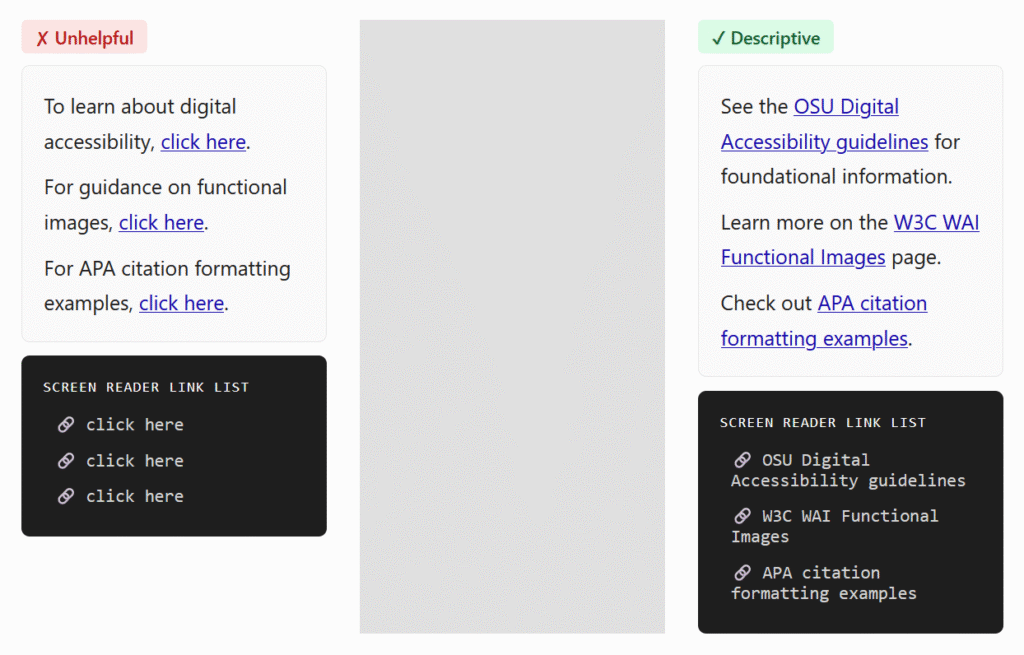
The golden rule of link accessibility: links should be descriptive! For foundational information on the why and the how, see OSU Digital Accessibility – Links.) Let’s dig deeper into a few common questions:
Can I use “click here” or “this” for my link text?
This practice is not ideal, and it’s best to avoid it. While WCAG does permit it when surrounding context provides enough information, you would not be creating a good experience for your audience. That type of text is not descriptive enough to show the user where the link will go, and it’s especially problematic if this text appears multiple times! Think of people skimming the content – whether visually or via assistive technologies. It’s much more helpful when the text clearly conveys the link’s function or destination. See an example below.
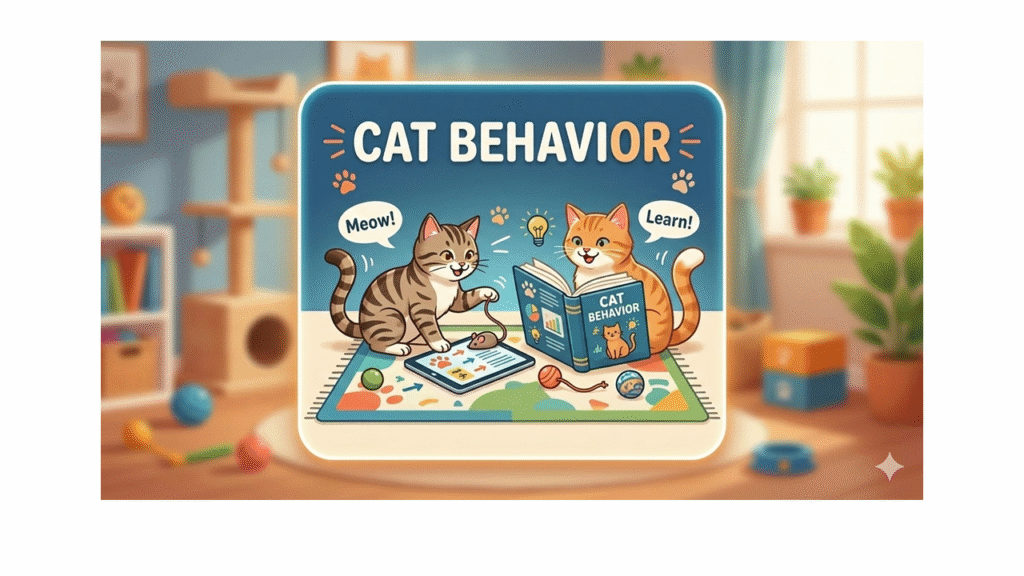
Can I link an image?
Yes, you can use an image directly as a link or button. But! If the image serves as a link on its own, make sure to write alt text that describes the action initiated by the link. The example image below is linked to an interactive lesson about cat behavior. Therefore, you would use the alt text “Cat Behavior Interactive Lesson”, NOT describe the image. See more explanations and examples on the W3C WAI Functional Images page.
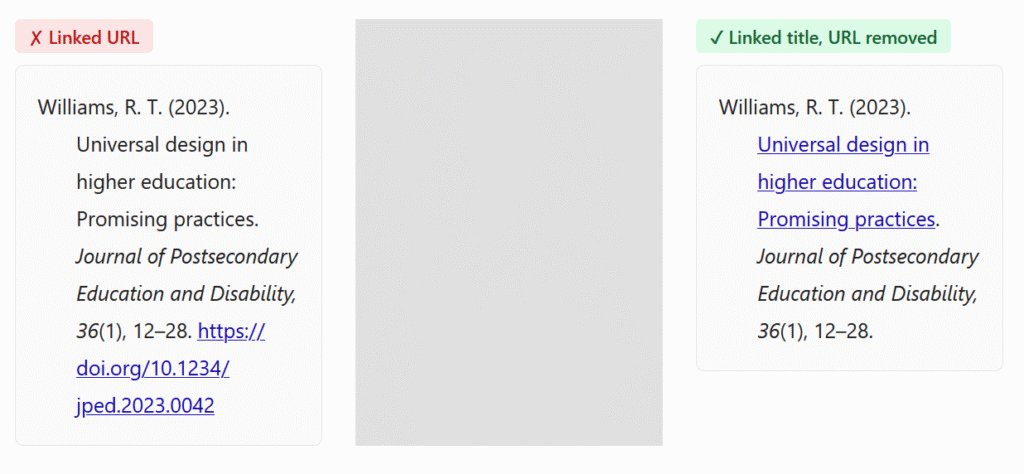
Proper citations include URLs. How do we make those accessible?
Citation styles may be strict, but they do allow some flexibility for online-only resources and materials outside of formal papers. The recommended practice is to link the work title and ditch the DOI or URL, like in the example below. Check out more examples and explanations for APA and for MLA.
Is it ok to repeat a link multiple times on a page?
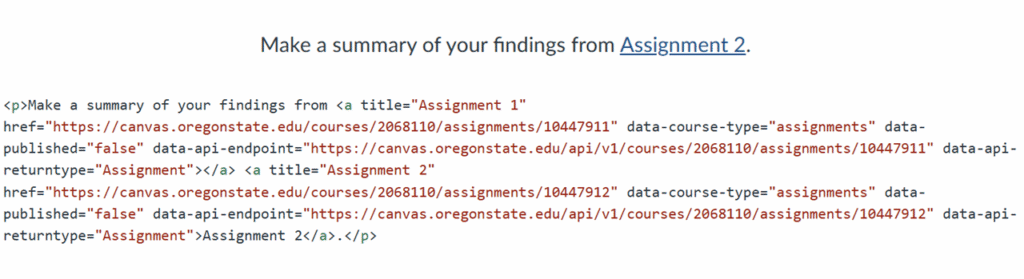
Canvas is flagging some links that don’t seem to exist!
You may have noticed, on occasion, “ghost links” in Canvas. The link validator or accessibility checker says there’s a broken or duplicate link, but when you look at the text, there’s nothing there. However, if you switch to the HTML editor, you’ll find the link lurking underneath. In the example below, you can see that there are actually two links instead of one: the Assignment 1 link was not completely deleted when I replaced it with Assignment 2.
What happens is that sometimes, if you delete text without unlinking first, the link may persist. To avoid this situation, make sure to remove the links before deleting or pasting in text.
BONUS link-related tip: Don’t underline regular text
Usually, links are underlined, and most people think of links when they see underlined text. This may be confusing when they try to access the link and it doesn’t work. In addition, underlining is just not a good way of highlighting information. For more information, see an article and video from Boise State University: Underlined text.
These practices make your course more readable, easy to navigate, and overall, more enjoyable for your students!
Open Education Week is an annual celebration that raises awareness of global efforts to make learning more “open” — that is, more affordable and accessible to students everywhere. Every March, this weeklong, online event gives educators and students an opportunity to learn more about open educational practices and be inspired by the work being developed around the world, including by Oregon State University faculty.
Research on rubrics has often focused on validity and reliability (Matshedisho, 2020), but more recent work explores how students actually interpret and use rubrics (Brookhart, 2015; Matshedisho, 2020; Taylor, 2024; Tessier, 2021). This emerging scholarship consistently shows a gap between instructor intention and student interpretation. For example, Matshedisho (2020) found that “students expected procedural and declarative guidance, while instructors expected conceptual, reflective work” (p. 175).
If students understand rubrics differently than we intend, rubrics cannot fully support learning. Below are key reasons this mismatch occurs—and strategies to close the gap.
Tacit Knowledge and Language
Students bring varied backgrounds, disciplinary exposure, and assumptions to their learning (Brookhart, 2015; Matshedisho, 2020). Many do not enter college knowing what a rubric is or how to apply one (Tessier, 2021).
Key issues include:
Unfamiliar terms or disciplinary jargon Early‑year students may lack field‑specific language. In Matshedisho’s (2020) study, first‑year medical students struggled with the sociological-specific criteria required for a reflective assignment.
Different meanings across disciplines Terms like “concept,” “analysis,” or “argument” shift across fields, confusing students taking multiple general‑education courses.
Ambiguous or subjective labels Students struggle to distinguish between words like good and very good, and terms such as “critical analysis” can feel subjective (Taylor, 2024).
Minimal differentiation between performance levels When descriptors are too similar, students, unable to discern differences between the ratings, cannot see how to progress.
How Students Use Rubrics
Students often approach rubrics differently than instructors expect:
They treat the rubric as separate from course content, starting with the criteria column and reading each cell in isolation (Matshedisho, 2020).
They search for procedural instructions, expecting the rubric to tell them how to complete the assignment (Matshedisho, 2020; Taylor, 2024; Tessier, 2021).
Many prefer hard‑copy rubrics over digital versions (Tessier, 2021; Panadero, 2025).
Bridging the Gap Through Instruction
Rubrics only support learning when students understand them as instructors intend (Brookhart, 2015). Effective strategies include:
Build Shared Understanding
Explain key terms and check for tacit knowledge—especially discipline‑specific language (Taylor, 2024).
Explicitly teach what a rubric is and how to use one; don’t assume prior knowledge (Tessier, 2021).
Calibrate expectations by discussing examples and rating sample work with students (Taylor, 2024).
Integrate Rubrics Into the Course
Refer to the rubric during lectures and discussions. (Tessier, 2021).
Provide feedback that directly connects to rubric criteria. (Matshedisho, 2020) (Taylor, 2024) (Tessier, 2021).
Celebrate or reinforce active rubric use (Tessier, 2021).
Provide hard copies of the rubric whenever possible (Tessier, 2021; Panadero, 2025).
Support Instructors
Offer training in rubric design and student‑centered implementation (Brookhart, 2015) (Taylor, 2024).
Use shared rubrics for multi‑section courses to support consistency.
Meet as a teaching team to create and calibrate the common rubric.
Recognize limitations of online rubric platforms; include clarifying hyperlinks or exemplars when possible (Panadero, 2025).
Clarify Task Expectations
Students often want a checklist. Provide procedural instructions separately, and use the rubric for conceptual evaluation (Matshedisho, 2020; Taylor, 2024; Tessier, 2021).
Conclusion
Research has proven that students comment favorably when it comes to questions referencing a rubric’s validity and reliability, but when the research focuses on how students interact with, understand, and apply the rubric, it is clear we still have a long way to go. Hopefully the suggestions above will get you started on the road to even better creation and application of your rubrics.
References
Brookhart, S. M. (2015). The quality and effectiveness of descriptive rubrics. Educational Review, 67(3), 343–368. doi:10.1080/00131911.2014.929565
Matshedisho, K. R. (2020). Straddling rows and columns: Students’ (mis)conceptions of an assessment rubric. Assessment & Evaluation in Higher Education, 169–179. doi:10.1080/02602938.2019.1616671
Panadero, E. O. (2025). Analysis of online rubric platforms: Advancing toward erubrics. Assessment & Evaluation in Higher Education, 31–49. doi:10.1080/02602938.2024.2345657
Taylor, B. K. (2024). Rubrics in higher education: An exploration of undergraduate students’ understanding and perspectives. Assessment & Evaluation in Higher Education, 799–809. doi:10.1080/02602938.2023.2299330
Tessier, L. (2021). Listening to student perspectives of rubrics: Perceptions, Uses, and Grades. Journal on Excellence in College Teaching, 32(3), 133–168.
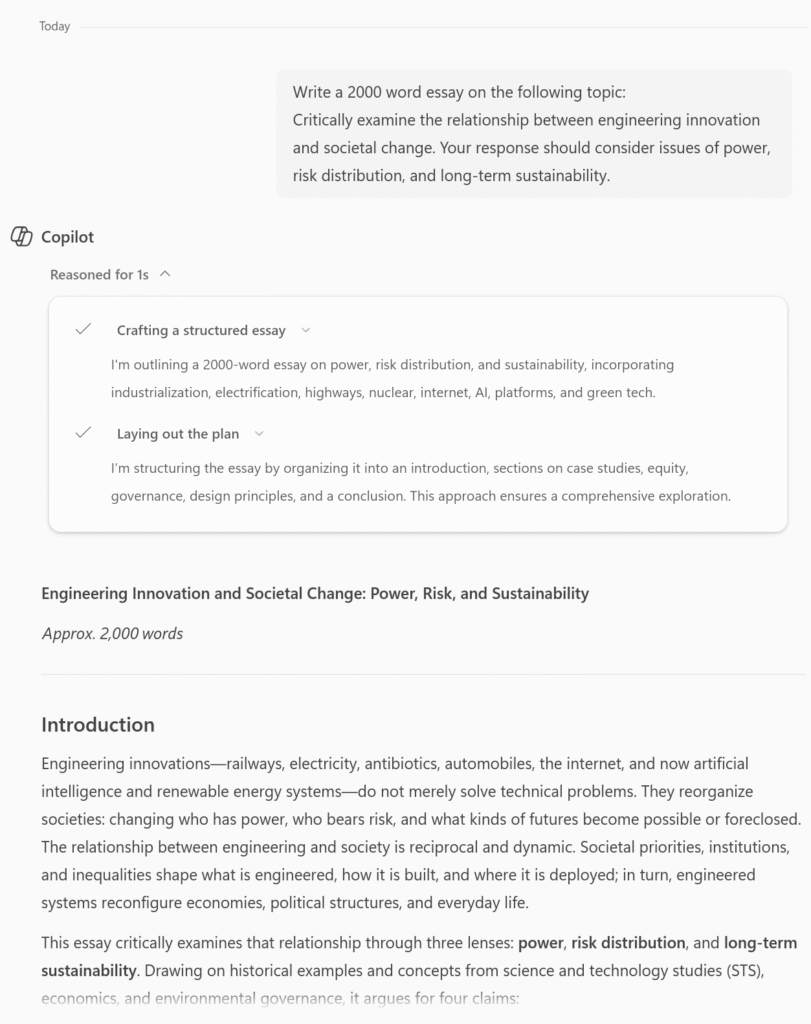
In the previous post, I gave an assignment prompt to Copilot (as that’s the recommended tool at Oregon State University) and asked it to complete the task. For reference, here is the task.
Rubrics are often the weakest link in assessment design, particularly when descriptors rely on vague phrases like “meets expectations” or “demonstrates understanding.” One way to evaluate rubric clarity is to ask AI to self-assess its own response using the rubric criteria.
If the model can plausibly justify a high score despite shallow reasoning or inconsistent logic, the rubric may not be clearly distinguishing levels of performance. More precise rubrics specify what evidence matters and how quality differs, emphasizing reasoning, coherence, and alignment with course concepts rather than polish or length. Clear criteria benefit students, but they also make it harder for superficially strong work to masquerade as deep learning.
Rubric Analysis Prompt (Click to expand)
You are now acting as an external assessment reviewer, not a student. You will be given:
An assignment prompt
A grading rubric
A model-generated student submission (your own prior response)
Your task is not to grade the submission. Instead, critically evaluate the rubric itself by answering the following:
Rubric Vulnerabilities
Identify specific rubric criteria or descriptors that allow a high score to be justified through fluent but shallow reasoning.
For each vulnerability, explain what kind of weak or superficial evidence could still plausibly receive a high score under the current wording.
Distinguishing Performance Levels
For at least three rubric categories, explain why the difference between “Excellent” and “Good” (or “Good” and “Satisfactory”) may be ambiguous in practice.
Describe what concrete evidence a human grader would need to reliably distinguish between those levels.
AI Self-Assessment Stress Test
Using your own generated submission as an example, explain how it could convincingly argue for a high score even if underlying understanding were limited.
Point to specific rubric language that enables this justification.
Rubric Strengthening Recommendations
Propose revised rubric language that makes expectations more explicit and evidence-based.
Emphasize observable reasoning, causal explanation, constraint awareness, or conceptual boundaries rather than general phrases such as “demonstrates understanding” or “well-justified.”
Constraints:
Do not rewrite the assignment prompt.
Do not assume access to course-specific lectures or materials.
Focus on how the rubric functions as an assessment instrument, not on pedagogy or student motivation.
Tone: Analytical, critical, and concrete. Avoid generic advice.
You could use this directly by attaching a rubric, assessment prompt, and “submission”, or modifying it to your own situation.
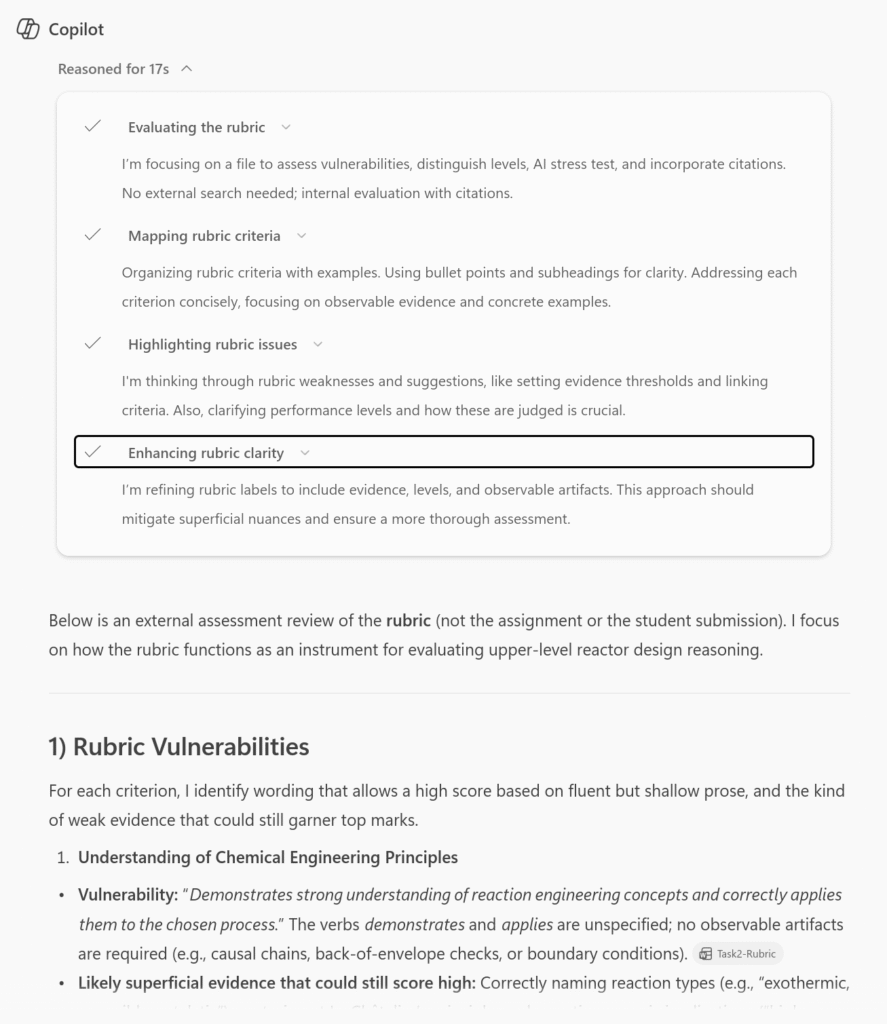
Here is a section of the results it gave, along with the “thinking” section expanded to see the process of the generated answer:
(Copilot gave me an enormous amount of feedback, as expected because the rubric included a lot of generic language.)
Rethinking “Higher-Order Thinking” in an AI-Rich Environment
Frameworks like Bloom’s Taxonomy remain useful, but AI complicates the assumption that higher-order tasks are automatically more resistant to outsourcing. AI can analyze, evaluate, and even create convincing responses if prompts are static and unconstrained.
What remains more difficult to outsource is judgment. Assignments that require students to choose among approaches, justify those choices, identify uncertainty, or explain when a method would fail tend to surface understanding more reliably than tasks that simply ask for analysis or synthesis. When reviewing AI-generated responses, a helpful question is: What would a human need to know to trust this answer? Designing assessments around that question shifts the focus from output to accountability.
Instructors can strengthen authenticity by introducing under specified scenarios, realistic limitations, or prompts that require students to articulate how they would evaluate the reliability of their own results. These design choices don’t prevent AI use, but they make it harder to succeed without understanding when and why an answer might be wrong.
An Iterative Design Loop for Assessments and Rubrics
Using AI as an assessment design diagnostic and refinement tool can work best as an iterative process. Draft the assignment and rubric, test them with AI, analyze how success is achieved, and revise accordingly. The goal is not to reach a point where AI “fails,” but rather a point where success requires engagement with disciplinary concepts and reasoning. This mirrors quality-assurance practices in other domains: catching misalignment early, refining specifications, and retesting until the design reliably produces the intended outcome. Importantly, this loop should be finite and purposeful, not an endless escalation.
Conclusion
using AI in assessment design is not about surveillance or enforcement. It is a transparency tool. When instructors acknowledge that AI exists and design accordingly, they reduce the incentive for adversarial behavior and increase clarity around expectations. Being open with students about the role of AI (what is permitted, what responsibility cannot be delegated, and how understanding will be evaluated) helps maintain trust while preserving academic standards. The credibility of online and in-person education alike depends not on stopping students from using tools, but on ensuring that passing a course still signifies meaningful learning.
Takeaway Cheat Sheet
Think of AI as support, not a villain.
Stress‑test early: run the rubric through a model for verification before you hand it to students.
For centuries, knowledge and access to education was restricted to just a few. In today’s’ world, almost anybody can access information through the web and more recently through AI tools. However, it is important to recognize that these tools, while offering expansive access to content of varied nature, also pose challenges. Generative AI has fundamentally changed how students interact with assignments, but it has also given instructors a powerful new lens for examining their own assessment design. Rather than treating AI solely as a threat to academic integrity, we can use it as a diagnostic tool – one that quickly reveals whether our assignments and rubrics are actually measuring what we think they are. If an AI can complete an assignment, and meet the stated criteria for success without engaging course-specific learning, is it really a student problem, or a signal to modify the design?
A small shift in perspective from “they’re using this to cheat” to “how can this help me prevent cheating” is especially important in online and hybrid environments, where traditional academic integrity controls like proctored exams are either unavailable or undesirable. Instead of trying to outmaneuver AI or police its use, instructors can ask a more productive question: What does success on this assignment actually require?
Why AI Is a Helpful Design Tool
AI can function as an unusually honest “devil’s advocate.” It doesn’t get tired, anxious, or confused about instructions, and it excels at finding the most efficient path to meeting stated requirements. When an instructor gives an AI model an assignment prompt and a rubric, the resulting output can expose whether the rubric rewards deep engagement or simply fluent compliance.
If an AI can generate a response that appears to meet expectations without referencing key course concepts, grappling with assumptions, or making meaningful decisions, then students can likely do the same. In this way, AI acts less like a cheating student and more like a mirror held up to our assessment design.
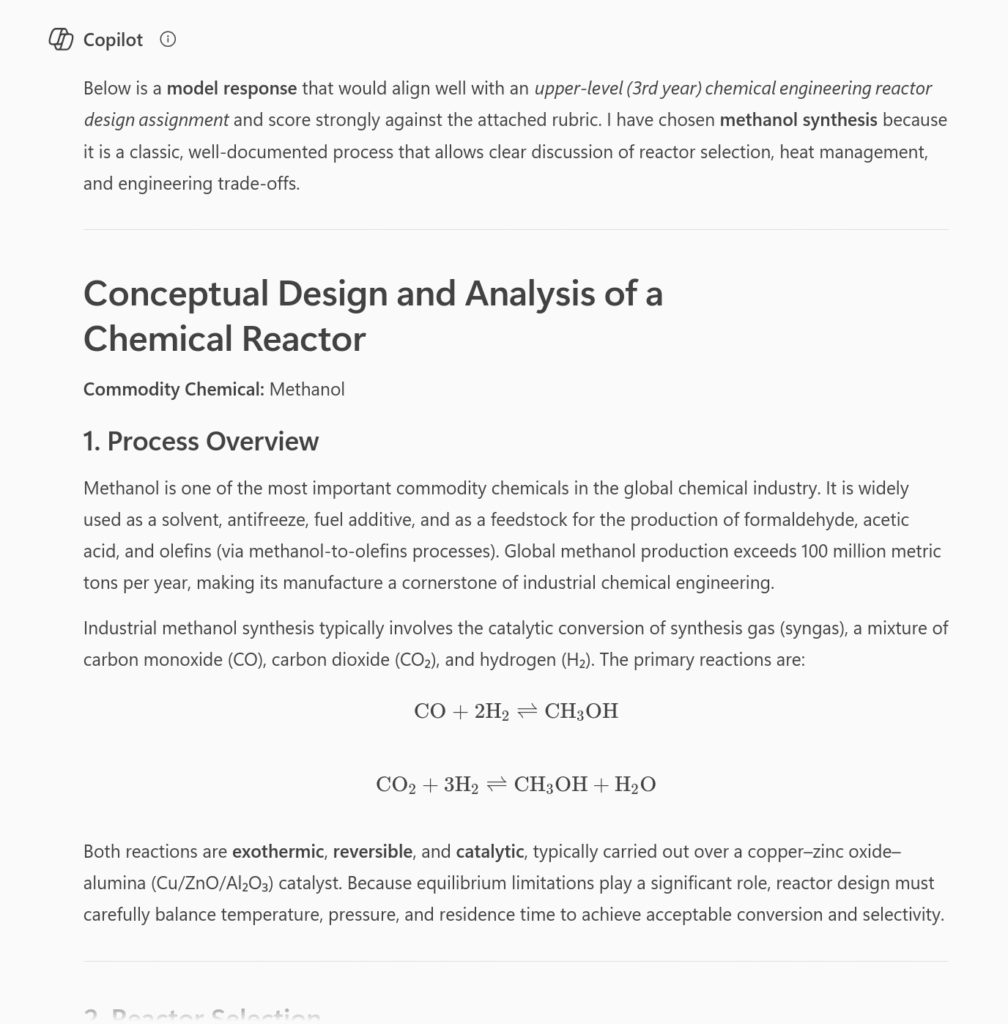
An example using Copilot:
Stress-Testing Assignments Before Students Ever See Them
One practical workflow to test the resilience of your assignments is to run them through AI before they are deployed. Provide the model with the prompt and the rubric (nothing else) and ask it to produce a strong submission. Then evaluate that response using your own grading criteria.
The point is not to judge whether the AI’s answer is “good,” but to analyze why it succeeds in meeting the set requirements easily and flawlessly (at first sight). If the response earns high marks through generic explanations, surface-level analysis, or broadly applicable reasoning, that’s evidence that the assessment may not be tightly aligned with course learning outcomes, focus on deeper thinking and analysis, or elicit students’ own creativity . This kind of stress-testing takes minutes, and often surfaces issues that would otherwise only become visible after grading a full cohort.
Assignment: Conceptual Design and Analysis of a Chemical Reactor
You are tasked with the preliminary design and analysis of a chemical reactor for the production of a commodity chemical of your choice (e.g., ammonia, methanol, ethylene oxide, sulfuric acid, or another well-established industrial product).
Your analysis should address the following:
Process Overview
Briefly describe the selected chemical process and its industrial relevance.
Identify the primary reaction(s) involved and classify the reaction type(s) (e.g., exothermic/endothermic, reversible/irreversible, catalytic/non-catalytic).
Reactor Selection
Propose an appropriate reactor type (e.g., CSTR, PFR, batch, packed bed).
Justify your selection based on reaction kinetics, heat transfer considerations, conversion goals, and operational constraints.
Operating Conditions
Discuss key operating variables such as temperature, pressure, residence time, and feed composition.
Explain how these variables influence conversion, selectivity, and safety.
Engineering Trade-Offs
Identify at least two major design trade-offs (e.g., conversion vs. selectivity, energy efficiency vs. safety, capital cost vs. operating cost).
Explain how an engineer might balance these trade-offs in practice.
Limitations and Assumptions
Clearly state any simplifying assumptions made in your analysis.
Discuss the limitations of your proposed design at this preliminary stage.
Your response should demonstrate clear engineering reasoning rather than detailed numerical calculations. Where appropriate, qualitative trends, simplified relationships, or order-of-magnitude reasoning may be used.
Length: ~1,000–1,200 words References: Not required, but accepted if used appropriately
The Rubric (Click to reveal)
Criterion
Excellent (A)
Good (B)
Satisfactory (C)
Unsatisfactory (D/F)
Understanding of Chemical Engineering Principles
Demonstrates strong understanding of reaction engineering concepts and correctly applies them to the chosen process
Demonstrates general understanding with minor conceptual gaps
Shows basic familiarity but with notable misunderstandings or oversimplifications
Demonstrates weak or incorrect understanding of core concepts
Reactor Selection & Justification
Reactor choice is well-justified using multiple relevant criteria (kinetics, heat transfer, safety, operability)
Reactor choice is reasonable but justification lacks depth or completeness
Reactor choice is weakly justified or based on limited reasoning
Reactor choice is inappropriate or unjustified
Analysis of Operating Conditions
Clearly explains how operating variables affect performance, safety, and efficiency
Explains effects of variables with minor omissions or inaccuracies
Provides limited or superficial discussion of operating conditions
Fails to meaningfully analyze operating variables
Engineering Trade-Offs
Insightfully identifies and explains realistic trade-offs, demonstrating engineering judgment
Identifies trade-offs but discussion lacks nuance or integration
Trade-offs are mentioned but poorly explained or generic
Trade-offs are absent or incorrect
Assumptions & Limitations
Assumptions are clearly stated and critically evaluated
Assumptions are stated but not fully examined
Assumptions are implicit or weakly articulated
Assumptions are missing or inappropriate
Clarity & Organization
Response is well-structured, clear, and professional
Generally clear with minor organizational issues
Organization or clarity interferes with understanding
Poorly organized or difficult to follow
Identifying Gaps in What We’re Measuring
AI performs particularly well on tasks that rely on recognition, pattern matching, and general world knowledge. This means it can easily succeed on assessments that emphasize recall, procedural execution, or elimination of obviously wrong answers. When that happens, the assessment may be measuring familiarity rather than understanding.
Revising these tasks does not require making them longer or more complex. Instead, instructors can focus on higher-order thinking and metacognition, for example requiring students to articulate why a particular approach applies, what assumptions are being made, or how results should be interpreted. These shifts move the assessment away from answer production and toward critical and disciplinary thinking – without assuming that AI use can or should be eliminated. The point of identifying the gaps can also help you revisit the structure of the assignment to determine how each of its elements (purpose, instructions/task/prompt, and criteria for success) are cohesively connected to strengthen the assignment.
In the second part of this blog, I take the same task above, and work with the AI to refine a rubric.
OER or open educational resources are openly licensed educational materials. What makes them different from other educational materials is the fact that they carry a Creative Commons (CC) license. This means that the person who created the OER, which could be a textbook, assessments, media, course syllabi, etc., has made it possible for others to reuse, revise, remix, redistribute and retain the work without needing to ask for permission. And, even better, OERs are FREE! How does this work in practice? Here’s an example. A professor at OSU writes a textbook on cell biology specifically for the course and gives it a Creative Commons license. Their students now have access to a free textbook on cell biology, tailored to the course, and saving the students hundreds of dollars. The students can keep it as long as they want (no rental returns or use limits). A professor at another university can take that same cell biology textbook and, without worrying about copyright violations or fair use evaluations, reorder the contents to better fit their course syllabus. They can add new, updated content like a recent discovery in gene therapy, or they can remove content that does not meet their course needs. Then they can release this work under a Creative Commons license, providing their students with a free textbook (also saving them oodles of money). It a win-win. Here at Oregon State University, since 2019, our students have saved more than $20 million thanks to OSU facultywho use free textbooks or other free and low-cost learning materials in their classes.
Why is this important?
Students have access to their course materials on day one and everyone has equal access to the course content.
Students don’t have to decide between buying textbooks and rent or food and they don’t have to reduce the number of courses they are taking because they won’t be able to pay for the course materials.
Students report feeling less stressed and a stronger sense of belonging when they don’t have to worry about affording their course materials.
Faculty can customize the course materials, aligning them with course learning outcomes, and making them more relevant to local circumstances or current events.
Faculty can support students as active creators of knowledge by having them contribute to and even create OER materials (open pedagogy).
Faculty can increase their own teaching impact by creating OER that are used across the globe.
Studies have shown that students using OER course material achieve the same or better learning outcomes as with commercial course materials.
In a 2022 survey of Oregon State University students, 61% of them didn’t purchase at least one textbook because of its high cost. By utilizing low ($40 or less) and no cost resources like OERs, you can have a huge impact on our students. For example, instead of deciding between food and rent or buying a textbook, students will have immediate access, which is significant in a 10-week term, to the texts for their class. This often leads to better performance in their classes because they have access to their textbook and aren’t trying to “get by” without it. Students can also take the amount of credits they wish to stay on track with their degree completion goals because the textbooks are now not a concern as far as affordability goes.
Where do I start?
Oregon State University has a growing collection of open, free to use textbooks across several disciplines. Check out the Oregon State University OER Commons and see if there’s a resource you could utilize. If you don’t find what you were looking for there, so many more resources exist, start with looking at the OER Commons main site. But wait, there’s more!
Open Education Week is an annual celebration that raises awareness about OERs. In past years, there have been success stories shared, tools highlighted, and how to get involved in adopting or adapting OERs for use in classes.
Keep an eye out for more details about Oregon State University’s activities during Oregon State University’s Open Ed Week for 2026 happening March 2-6, 2026. Whether you’re a faculty member curious about open textbooks or a student interested in more affordable learning materials, there will be plenty of ways to participate and learn more.
Accessibility is a hot topic these days, and alt text is one of its most significant building blocks. There are many comprehensive resources and tutorials out there, so I won’t get into what alt text is or how to write it (if you need an intro, start here: OSU Digital Accessibility – Alternative Text for Images). In this post, I’ll address a few issues where guidance is less clear-cut and that have come up in my conversations with instructors.
Does alt text have a character limit?
You’ve done the work and written a detailed alt text that you’re proud of. You hit “done” and, much to your frustration, the Canvas editor is flagging your image and saying: “Alt attribute text should not contain more than 120 characters.” What’s going on here? Is there really a limit, and why is it so?
Well, this is one of those things where you’ll find lots of conflicting information. Some people say that assistive devices only read the first 140 characters; others, the first 150; yet others argue there are no such limits with modern tech. See this article: 100, 150, or 200? Debunking the Alt text character limit, which has more info and references, including a nod to NASA’s famous alt text for the James Webb telescope images.
One thing is clear though: alt text should be short and sweet, to make it easy on the users. Keep the purpose in mind and address it as succinctly as you can. However, if your carefully written alt text still exceeds Canvas’s limit of 120 characters, don’t fret – that constraint is probably too restrictive anyway. But if the image is complex and needs a much longer description, use a different method (see more options below).
How should I use a long description?
When you have an image that contains a lot of information, such as a graph or a map, you need both alt text and a long description. The alt text is short (e.g., “Graph of employment trends 2025”), while the long description is detailed (e.g., it would describe the axes and bars, numbers etc.). The W3C Web Accessibility Initiative (WAI) – Complex Images Tutorial explains a few ways you can add a long description. The most common ones (and that I would recommend) are:
Put the long description on a separate page or in a file and add a link to it next to the image.
Put the long description on the same page in the text (under a special heading or simply in the main content) and include its location in the alt text (e.g., “Graph of employment trends 2025. Described under the heading Employment Trends”.)
The advantage of these methods is that everyone, not just people using assistive technologies, can access them. The description can benefit people with other disabilities or those who simply need more help understanding complex graphics.
But wait, what about image captions? Do they duplicate alt text?
Image captions can be used in various ways: as a short title for the picture, as related commentary, or as a full explanation (see an example of alt text vs. caption). In any case, avoid duplicating content between the caption and the alt text. If the caption doesn’t include a sufficient description, make sure you have that in the alt text. Alternatively, you can keep the alt text very short and use the caption for a longer description that everyone can read (I wouldn’t recommend very long ones, though – those may be better placed elsewhere, as described above).
For web pages, it’s best to add the caption using the <figcaption> element. This ensures that your caption is semantically linked to its image. If you like editing the HTML in your LMS, check out the W3Schools tutorial on the HTML <figcaption> Tag.
Should the alt text describe people’s gender, race, age etc.?
It really depends on what you are trying to convey and how much you know about the individuals in the image. Are those details significant? If yes, you should include them. Are you making any assumptions? Make sure not to project your own ideas about who the person is. This guide from University of Colorado Boulder: Identity and Inclusion in Alt Text is a great resource to refer to when faced with these decisions.
It’s 2026! Can’t I just get AI to write the alt text?
You’re right that AI tools can be a great help in writing alt text or long descriptions! We often recommend ASU’s Image Accessibility Creator. But, as you’re aware, LLMs are not always correct. Moreover, they don’t know what exactly you want your students to get from that image (well, you could tell them, but that may be as much effort as writing the alt text yourself…). Make sure you always check the output for accuracy and revise it to fit your purpose and context.
Once the term begins, you and your students enter into a full motion of course activities—getting connected with one another and moving along the education journey together. Then, when you realize it is the end of the term! I have heard many instructors saying things like “I can’t believe how fast this term has gone!”, “It’s already week 10, and I don’t know where time went!” And with the term at its conclusion, it is an opportunity to debrief, reflect, and take time for self-kindness, for both instructors and instructional designers.
Debrief
A debrief is an activity that helps close out the course development project. A debrief can help instructors more intentionally discuss how the course development process worked in a particular course, identify the challenges that took place while teaching, and outline future improvements and more effective course design approaches (Chatterjee, Juvale, & Jaramillo Cherrez, 2023). If you are an instructor who worked with an instructional designer to develop the course that you just finished teaching, it is important to meet with them and discuss how the course went, what worked well, what items presented challenges for students as well as for the instructors that immediate changes or improvements can be addressed as these are fresh in mind, and what major updates or changes are required before the course is taught again. These debriefs can take place during the last weeks of the term (e.g., finals week or the week after) and be initiated by the instructional designer as a way to close out the course development project, or by the instructor to seek additional instructional design assistance for improvements.
Reflection
Why would you want to reflect as an instructor? Generally speaking, reflection can serve as a mechanism to deliberately process and examine your actions, thoughts, and experiences in developing and teaching the course. For reflection after the term, we will focus on reflection-on-action, which is engaging in this deliberate process after the fact (Brookfield, 2017; Schön, 1987)—after you have taught the course. In reflecting about your course development and teaching experience at the end of the term, you may have the opportunity to not only describe what those experiences were like but also the opportunity to question and evaluate design and teaching choices, identify additional challenges presented in the context of the course, and reviewing student feedback to better understand the instructional design decisions that were successful and those that failed to accomplish your goals and the goals of the course. Reflection can be part of the debrief, but also a regular practice to look back at the course development and teaching experience for future improvements.
Self-Kindness
Self-kindness is not a new concept, but it may well be in the context of education. Applying this concept to your online course development and teaching experience means that you engage in kind actions to yourself—actions to treat yourself with care, compassion, and consideration (Denial, 2023). At the end of the term, as you debrief and/or reflect, think about the teaching actions that went well and consider how they made you feel. Give yourself grace and compassion because you are a human being and capable of so many great things, while acknowledging that the context and experiences may shape us in multiple ways. Also, because you have created an excellent online course and your teaching presence has elevated its quality. In exercising self-kindness, you may feel vulnerable as you may start recognizing the challenges and struggles in your academic and personal lives. Consider giving yourself the same compassion that you can give a loved one or a close friend, recognizing that the challenges, struggles, and failures are part of the human experience—even in teaching. Self-kindness is a way to direct your attention and actions away from judgments and shortcomings. Take care.
I’m curious, how do you conclude a term? Are there specific self-care actions that you take besides grading and submitting final grades?
References
Brookfield, S. 2017. Becoming a critically reflective teacher. 2nd ed. Jossey-Bass
Chatterjee, R., Juvale, D., & Jaramillo Cherrez, N. (2023). What the debriefs unfold. A multicase study of their experiences of higher education faculty in designing and teaching their asynchronous online courses. The Quarterly Review of Distance Education, 24(1), 25-41.
Customizing your Canvas course is a simple way to create a smoother, more intuitive learning experience—for both you and your students. With a few strategic adjustments, you can create a polished, efficient Canvas set-up that gives students a clean, streamlined learning environment.
Personalize Your Home Page
Instructors can choose which page students see first when clicking into their Canvas course, and a well-designed homepage can act as a dashboard for the entire course. Most Ecampus courses have a home page that includes a custom banner with the course code and name as well as links to the modules, Start Here module, and Syllabus page. You might want to add links to external tools or websites your students will use frequently for easy access. You can also pin up to five of the most recent announcements to the home page, which can help students quickly see important information (see “Course Details” below for instructions).
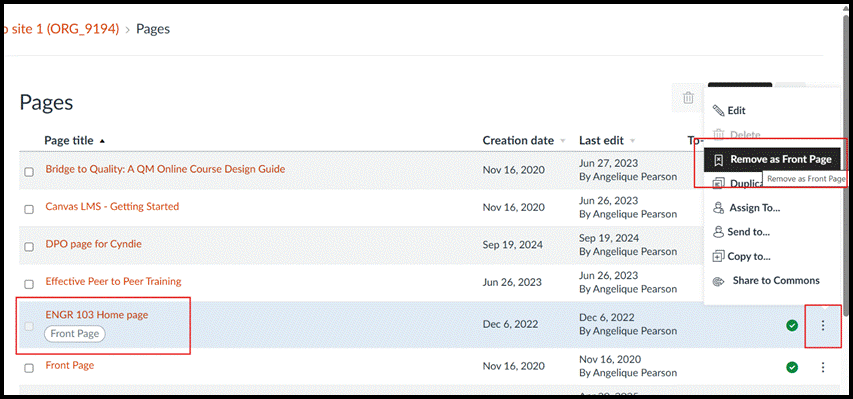
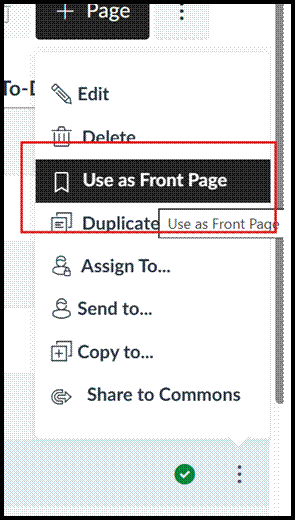
If you want to change which page your course defaults to, click the “pages” tab in the course menu, then click “view all pages”. Your current course home page will appear with the tag “front page”. To change it, click the three dots and choose “remove as front page”. Then choose the three dots menu next to the page you want and you’ll see a new option, “use as front page”.
The Gradebook
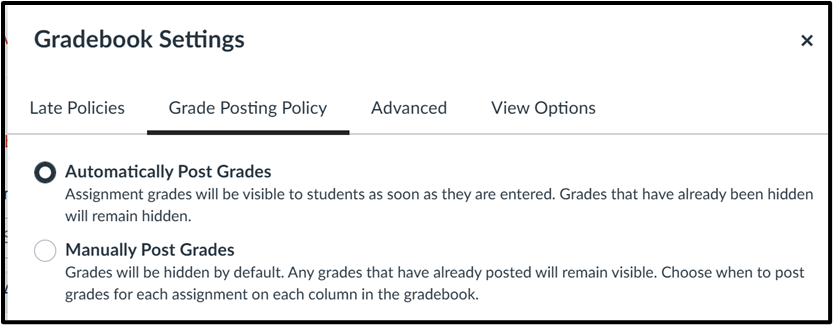
The next area you will want to check is your gradebook, as there are many options you can set to help streamline grading. Click the settings gear icon to pop out the gradebook settings menu. The first option is choosing a default grade or percentage deduction for late assignment submissions. Automating this calculation is extremely helpful for both instructors and students, especially if you want grades to decrease a certain percentage each day.
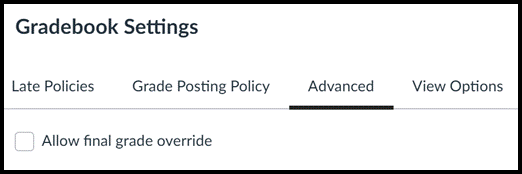
The next tab allows you to choose whether you want grades to be posted automatically or manually as your default setting. The third tab, “advanced”, enables an instructor to manually override the final grades calculated by Canvas.
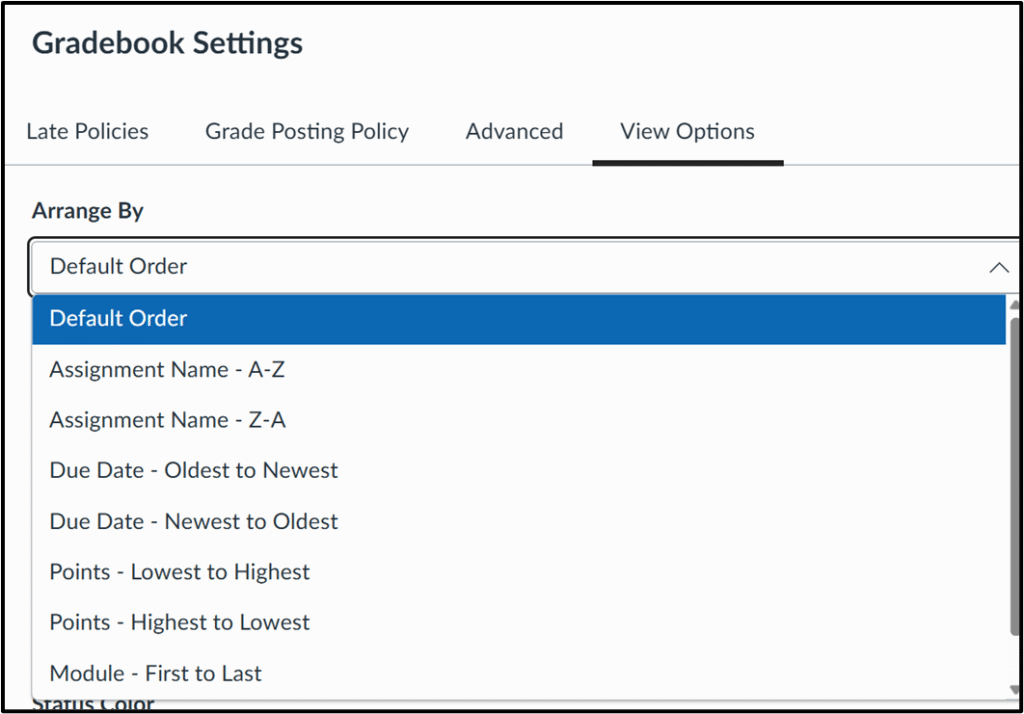
The last tab, “view options”, contains several ways to tweak the appearance of your gradebook. The first option is determining how the gradebook displays assignments, defaulting to the order they appear on the assignments page. You can change that if you prefer to see assignments in one of the other possible arrangements (see image below).
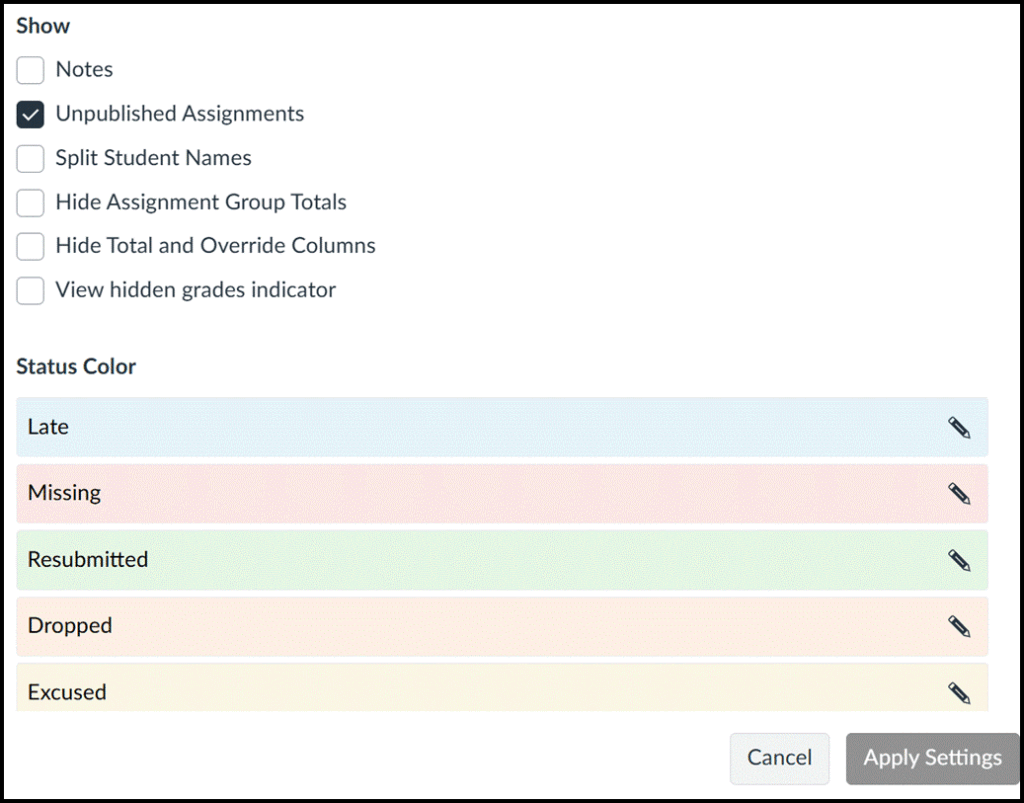
You can choose which columns you want to see when you launch the gradebook, with the option to add a notes column, visible only to instructors, which appears to the right of student names. Many instructors use the notes column as a field where they can track interactions and keep important information about students. You can also change the default gradebook colors that indicate whether a submission was late, missing or excused.
The Settings Tab
The settings tab in your Canvas course is hiding some features you might not know you have access to that allow you to customize your course. Let’s look more closely at three of the sections you’ll see there: course details, navigation, and feature options.
Course Details
There are a few options you can change under the course details section, though it is important to note that there are settings here that you should NOT adjust, including the time zone, participation, start and end dates, language, visibility, and any other setting besides the specific ones described below. These settings are put in place by OSU and should not be changed.
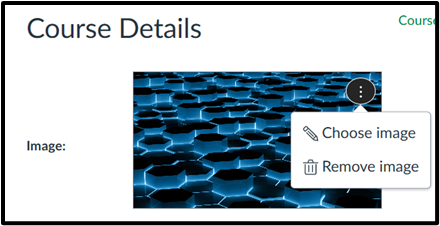
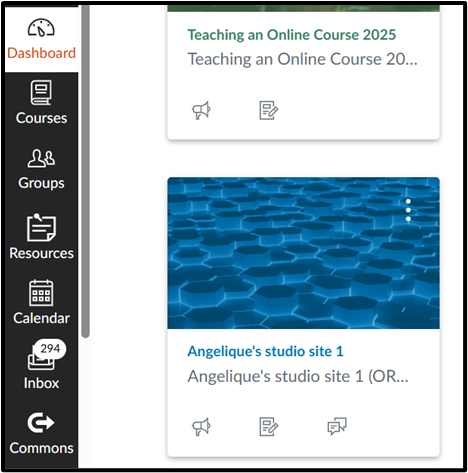
At the top of this section, there is a place to upload or change your course image, which is mirrored on the dashboard view for both you and students. Adding an image here that represents your course content can help students visually find your course quickly on their Canvas dashboard.
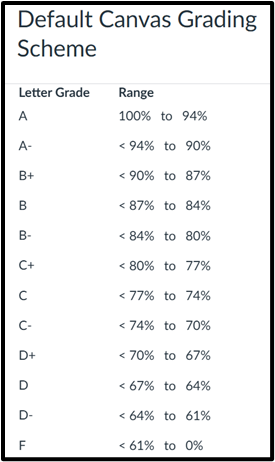
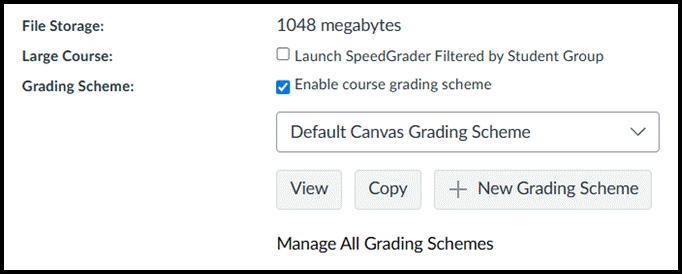
The next section of interest is the grading scheme. Canvas has set a default grading scheme, shown in the chart below, so if the default scheme works, you do not need to adjust it. However, if your department or course syllabus uses different score ranges than the default scheme, you can create your own.
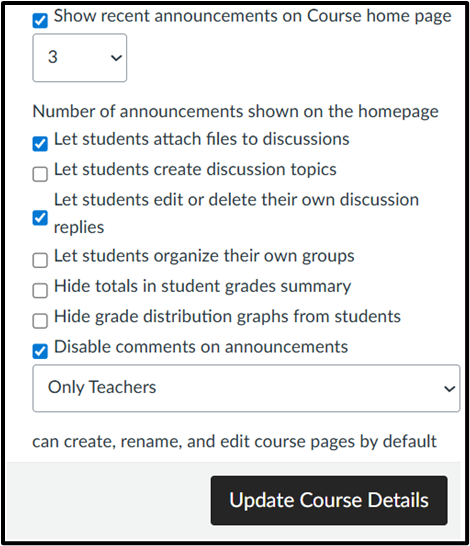
Another area in this section you may want to consider is the bottom set of options, seen in the image below. Here, you have the ability to show up to five most recent announcements to the course homepage, which helps ensure students see important messages when they navigate to your course. Click the checkbox to show recent announcements and choose how many you’d like students to see.
There are some other options here, giving instructors the choice to allow students to create their own discussion boards, edit or delete their discussion replies, or attach files to discussions. There is also the option to allow students to form their own groups. Additionally, instructors can hide totals in the student grade summary, hide the grade distribution graphs from student view, and disable or enable comments on announcements. Be sure to remember to click the “update course details” box when editing course details to save any changes you make.
Navigation
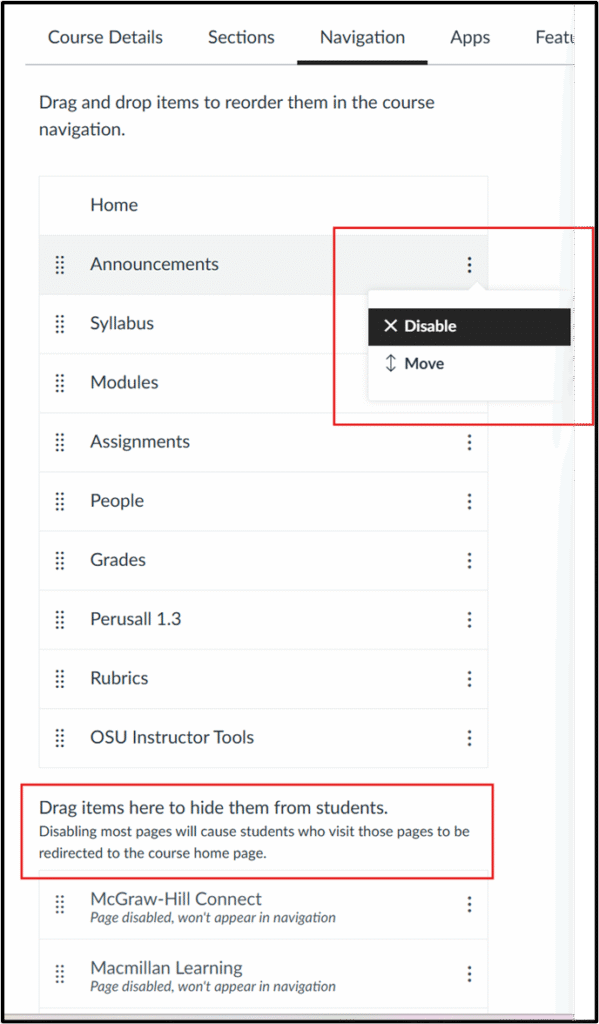
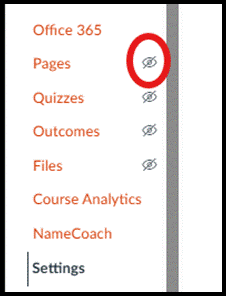
The next section instructors may want to explore is navigation, which controls the Canvas course links that appear in the left-hand menu. This simple interface lets you enable or disable links to customize what links students see in the left-side navigation menu. We recommend checking your course to be sure that the tabs students need are enabled, such as syllabus and assignments, and others such as instructor-only areas like pages and files, are hidden from students. Navigation items including OSU Instructor Tools, Ally Course Accessibility Report, and UDOIT Accessibility never show to students and should be left enabled. You can also enable links to any external tools, like Perusall or Peerceptiv, you may be using in your course.
In your course, disabled links will not be visible to students, marked with the crossed-out eye icon denoting that they are hidden, but you will still see them. To enable/disable a menu item, use the three dots menu or simply grab and drag menu items to the top (enabled) or bottom (disabled) section, and remember to click save at the bottom of the screen. You will immediately be able to see a change in your course menu.
Feature Options
The final section you might want to explore is Feature Options, which lists features that you can turn on or off. This usually includes previews of features that Instructure is beta testing. Clicking the arrow icon next to each shows a brief description of the option. You’ll see disabled features marked with a red X, while enabled ones are marked with a green checkmark- you can toggle these on and off with a click.
Some features you might be interested in testing out include the following:
Assignment enhancements (improves the assignment interface and submission workflow for students)
Enhanced rubrics (a new, more robust tool for creating and managing rubrics)
Smart search (uses AI to improve searchability within a course; currently searches content pages, announcements, discussion prompts and assignment descriptions)
Submission stickers (a fun one you can add if you enable assignment enhancement)
While these may seem like small changes individually, customizing the look and feel of your Canvas course can have a big effect on your students’ learning experience. Contact Ecampus faculty support if you have any questions or need assistance personalizing your course.
The saying “students may forget what we teach, but they’ll remember how we made them feel” is such an important idea that could help us start thinking about how to make online learning a space that fosters belonging, connection, respect for individual differences, and authentic participation. In support of instructional design practices and teaching approaches that can accomplish these aspects, online course design and teaching can be transformative for students (and instructors) when more human-centered strategies are built into the courses, strategies that go beyond cognitive tasks and challenges, and attend to the well-being of students and instructors. What if these practices and approaches are built upon kindness? Cate Denial’s (2024) “A Pedagogy of Kindness” invites us to explore ways in which we can do that.
In this first blog, I will share the foundational notion of “A Pedagogy of Kindness” and its main components. I will also offer a brief example to illustrate a step in applying this kind of pedagogy in an online course.
Denial’s View of Academia and Teaching
In the book, Denial shares her own journey through academia, as a first-generation student and as an academic navigating the intricacies of higher education in the U.S. At the same time, Denial is critical of the culture of higher education that poses many challenges to all to be more caring and kinder to themselves and each other. Through accounts of her own experience as an undergraduate, graduate, and academic in higher education, Denial argues that academia socializes individuals into a culture of power dynamics that emphasizes competition, the pursuit of individual excellence, ableism, and exclusion. This socialization made Denial question the vision, perceptions, and warnings about students: they cheat, won’t do their assignments, want easy ways to pass a course, challenge professors, and should be under suspicion all the time. However, through a process of reflective practice and being asked to defend pedagogical choices, Denial realized she could not defend the indefensible. The choice was clear: why not be kind to students and, through kindness, make a difference in their lives and their educational journeys?
Kindness and Pedagogy
But what does kindness have to do with pedagogy and with online teaching and learning? The short answer is “everything.” Kindness helps to direct our attention, actions, and thoughts to being compassionate and considerate to those around us, physically and virtually. But what is kindness in the first place? Denial defines it in terms of what it is not: It is not about being nice because being nice is hypocritical, underscores power imbalances, presupposes a traditional view of rigor, and leads to burnout—all because of the efforts to disguise actions and thoughts as pleasant when they are less so. Kindness, instead, is a more genuine way to care for others—an approach that makes all see opportunities to bring equity, embrace accountability for our actions and thoughts, and remind ourselves that we live and thrive through compassion even in darker times.
Pedagogy of Kindness Framework
In the Pedagogy of Kindness framework, Denial presents three intersecting elements: a vision for justice, believing students, and believing in students. And these three elements point to considering students’ personal responsibilities, work commitments, financial obligations, disabilities, and attitudes toward the world around them (e.g., politics, climate change), and meet them where they are. In addition, Denial posits that “[w]e must take a hard look at what we’re asking students to do and then identify if there is value in it….If there is, we need to be able to explain that value to students as clearly and directly as we can.” (p 17) Denial’s framework for a pedagogy of kindness rests on three intersecting principles:
Justice: In this element, we should consider:
Who our students are
Give students the benefit of the doubt when something outlandish occurs
Believe in what students share about their educational experiences
Believe Students:
Cultivate trust
Be ready to deal with a situation or crisis rather than putting all under suspicion
Discuss with students ethical decisions
Believe in Students:
Students want to learn—they have creativity, capacity, and thoughtfulness
Establish collaboration for mutual learning
Pedagogy of Kindness in Online Education
This framework can be integrated into a course in multiple ways, through the teaching approach, syllabus, class practices, and overall interactions with students. For instance, in one online course I helped design, the language in the Artificial Intelligence policy said something to the effect of “If the assignment is written with AI, you will receive a zero.” In order to cultivate trust and help the instructor prepare to deal with any academic misconduct, we revisited the description of the policy, highlighting the value of students’ own work, ideas, and reflections. The policy language also acknowledged the challenges in completing the assignment and reinforced the importance of the learning process more than the product of the assignment. This example speaks to the believe students and believe in students elements of the pedagogy of kindness.
Now, how might you make kindness visible in your own online teaching?
A second part of this blog will provide examples and practical ways of how Pedagogy of Kindness grounded the design and facilitation of online courses.