Fun experiences from game development
In last week and this week, I spent lot of time to explore Blueprints and Behavior tree in Unreal Engine 4.

Here is the Blueprints for launch pad. It is really interesting that we are able to understand what these action works easily. The first action “On component Begin Overlap” can detect when something is overlapped. If player pawn and overlapped object are equal, We cast “Launch Character” action with launch velocity z = 3000 to the target object. This seems like easy at the point.

This is the Behavior tree I created for enemy AI that patrol randomly and chase player if it detects player. I needed to design 2 of Behavior tree task blueprints, blueprint for enemy character, and blueprint for enemy controller that control the perception of enemy character. To implement this AI, I needed to understand how these blueprints interact each others. One experience that I would like to share is that we should “Compile” each blueprint. When I was making instance editable value for my behavior tree, I could not find the value on my Behavior tree, though I changed it to instance editable value. Eventually, the value is displayed after I compile the blueprints.
Do you like debugging?
It is stressful to see error messages and unexpected execution, but I think debugging is good opportunity to see if I really understand what I am doing in the project. In small programming projects, we might use print statements to see where the bugs are coming from.
something1
printf("A");
something2
printf("B");
something3
printf("C");
For Behavior tree, we are able to debug visually like that.
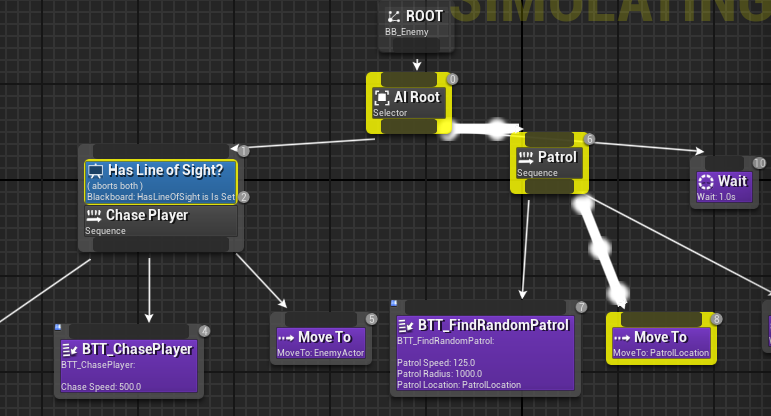
In this picture, we can see that my enemy AI is moving to PatrolLocation which is random location on the map. By using this feature, I could find that my enemy AI properly executes random patrol action, and it does not execute chase player action. It was obvious that “Has Line of Sight” has some issues or the HasLineOfSight value is not passing proper value for my Behavior tree. In this debugging phase, I promote a better understanding of the intersection of each blueprint and behavior tree in Unreal Engine 4. It was stressful to see my poor blinded enemy, but it was a good experience to learn things from my mistakes.
