Last week I went over the basics of Postman testing for a REST API. I detailed how to create an environment, a collection, and how to set up a basic request. Today I’m going to go into more detail on tests you can run while making your request. Automated tests can look for many things including HTTP response status, response body attributes, and response time. In fact, Postman makes it extremely easy to setup these tests by providing prewritten tests for the user to work off of.
Tests
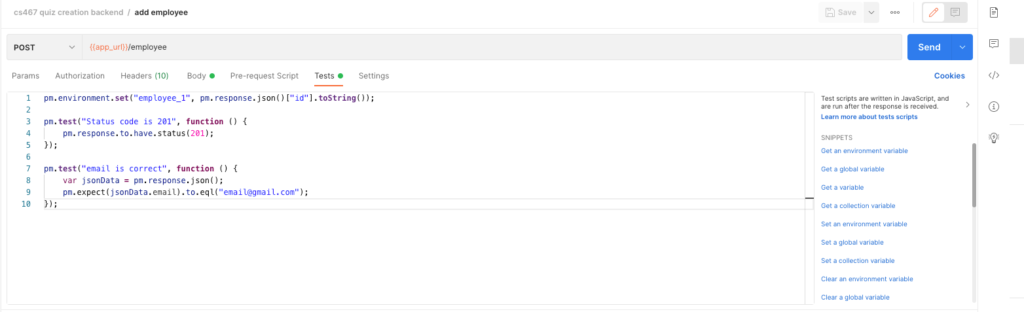
As can be seen in the image above, I have three different blocks of code in my Tests screen. The first block is setting up an environment variable for future requests I’m going to make. That was covered last week. The second test is looking for a specific response status, in this case 201. You can name the test anything you want, and you can look for any status that is appropriate for your test. The third test is looking at the response body and making sure that what is returned is exactly what I’m expecting. Something to notice about all of this is that all of the tests are written in JavaScript. While everyone might not know JavaScript, these small code blocks are fairly simple and easy to tell whats going on just by reading the code.
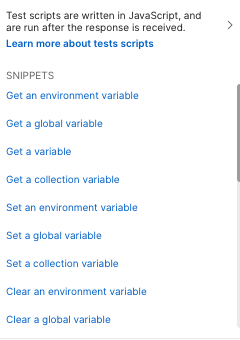
Postman also provides many prewritten tests as can be seen above. All of the tests I’ve written in Postman are based on the ones already provided. Just click on the test you want and it will appear in the tests section. Once you’ve submitted your request, the tests will run and the number of tests that have passed will appear on the bottom of the screen. Passed tests will have a green color to indicate success. The title that was given to the test will be displayed as well, so make sure to make that informative as to what is being tested.

For tests that have not passed, they will have a red color. They will also tell you why the test failed. In this case I was expecting a 201 response for my POST request, but I received a 400 response due to an error in the request body.

Creating well thought out tests can be a lifesaver when working with APIs. While it will require more work up front, naming the tests appropriately and being thorough with your testing suite will ultimately save you time as you find errors in your API.