This week, I had to put together the entire OAuth flow together with my team-mates. The task started with some pretty straight-forward instructions which I followed using the google OAuth 2.0 library. For those interested, you can find more details here: http://www.passportjs.org/packages/passport-google-oauth2/
The part that was took more time than usual actually was session management. In the strategy that I was using, after authenticating the user, I had to keep track on whether the user is actually logged on using a server-side session.
A server-side session is essentially session object that is stored on the server and can be identified/accessed by a unique id that is generated when the session was first created. The id is then passed to the client and whenever the client wants to have access to the session data, the sessionid is the identifier in assessing the data. Here is a diagram that illustrates the flow.
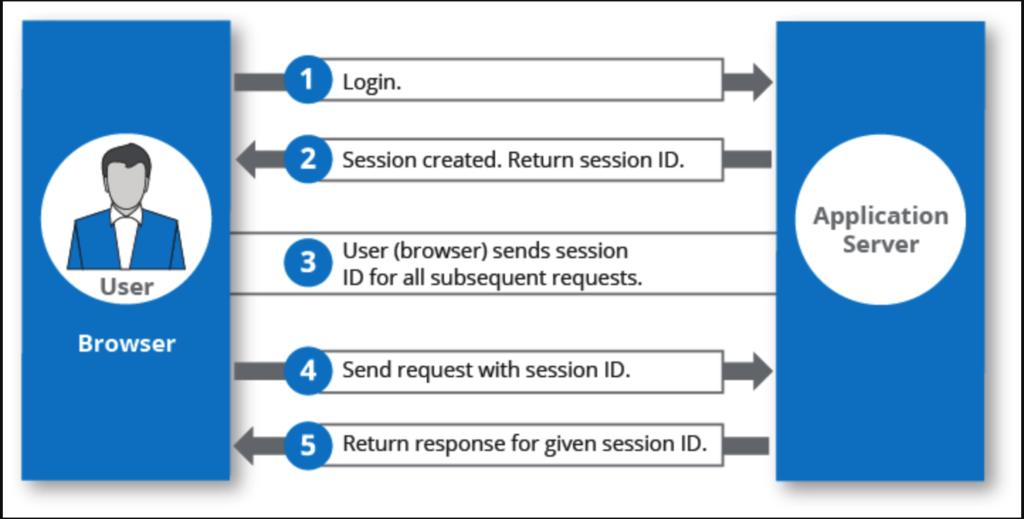
I had everything working on localhost and my local environment and I could access the server-side session consistently. However, when I deploy it to the cloud, the behavior started to become inconsistent and it sometimes fail to locate the session information even though it clearly was there before at some point in the application life-cycle.
My moment of Eureka came when I recalled in my cloud engineering class that the servers/application in the cloud are actually transient and they aren’t designed to be parked there forever. Moreover, depending on the strategy, there might be more than 1 copy of the server application for performance reasons. Thus, the memory/session might be lost when the server decommissions in the cloud or it simply won’t exists if it hits the “wrong” server. With this realization, I was very quickly able to solve the inconsistencies that I have by configuring the cloud server to be “alive” longer and writing the necessary code for situations where the session is not found. I also configured the cloud to not deploy > 1 server. Through this situation, I also found out about sticky sessions which could be configured (although I haven’t done it yet).
Amazing how all the little knowledge adds up throughout this course and it actually helped solve some of the problems.
