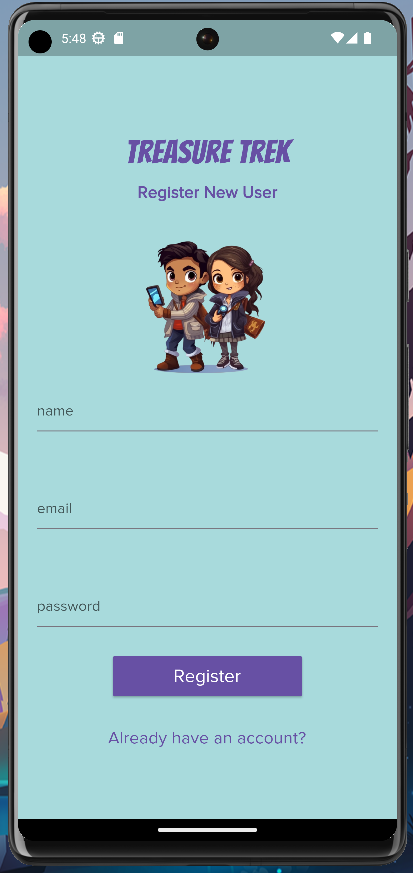
Developing my Mobile Treasure Hunt game on Android while employing Chat GPT has been an exciting and rewarding adventure thus far. However, there are still challenges you will encounter while taking on such an endeavor. As part of a team of three, each working on our own versions of this game while incorporating AI tools to varying degrees, we have encountered various hurdles along the way. In this blog post, I’m going to cover some tips and tricks for when you navigate through common obstacles, leverage AI tools like ChatGPT and Midjourney, and some debugging methods to streamline your development process.
- Overcoming “Stuck” Moments:
When I find myself stuck on a coding problem or when I face a roadblock in development, I like to employ a systematic approach in these situations. Here are a few tips to help you navigate similar situations:- Break it down: Analyze the problem at hand, break it into smaller parts, and tackle them one at a time. For example, instead of going through your entire code base, find the line of code where your app is crashing and break down the function into smaller steps so that you can trace the problem. This approach helps create a manageable problem-solving process and helps me focus on the issue.
- Seek help: Reach out to your team members, teaching assistants, mentors, or online communities. Discussing the problem with others gives me a fresh perspective and solutions I did not even consider. Even talking out the problem aloud to my partner helps me realize something I may have overlooked.
- Take a break: Sometimes stepping away from the problem for a bit and returning with a fresh mind can be extremely beneficial. When I hit a roadblock and I’ve been working on the same issue for a long time, the biggest help for me is going on a walk outside. These walks usually help me refresh my brain instead of staring at my monitor for hours.
- Learning New Technologies:
Embracing new technologies is crucial for enhancing our skills and staying relevant. In my opinion, this is not just vital for our industry but also for life in general. We should all adopt a childlike enthusiasm for learning and stay hungry in a growth mindset. Below are some of my favorite approaches to learning new tools or technologies:- Explore online learning platforms: Platforms like Udemy offer a ton of courses that provide a structured and visual approach to learning. I tend to learn best in this manner rather than by reading tons of documentation. I found that leveraging resources like Udemy helped me gain a solid foundation for the technology that I’m interested in learning. In fact, I went through a Udemy course on Flutter to help me on this project. If you’re going to buy a course on Udemy, be sure to do so when it’s on sale! Udemy has many sales throughout the year, so you should avoid paying full price.
- Practical implementation: Apply what you are learning by implementing small projects! When I first started this program, I thought I could apply the same learning techniques I used in law school, like reading all the documentation and memorizing everything. Oh, how wrong I was. During my tenure as a computer science student, I’ve found that working on projects to demonstrate what I learn is the best approach to learning. Plus, it’s fun!
- Engage with the community: Join relevant forums or social media groups (Discords for me) related to the technology you are learning. Engaging with fellow students and experts can be extremely valuable when attempting to overcome challenges. The “Flutterdev” subreddit and the Midjourney Discord are both helpful resources, in my experience.
- Leveraging AI Tools:
If you’re working on an AI Coder project or even any type of development project, utilizing AI tools in 2023 can boost your productivity and efficiency. Below are some ways I integrate ChatGPT and Midjourney into my workflow:- Using ChatGPT for debugging: During this journey, I’ve found that ChatGPT is an extremely valuable companion for debugging code. Whenever I’ve encountered an issue with this project, I’ve consulted ChatGPT by showing them the specific stack trace or messages from the debug console. Usually, GPT-4 is pretty good at deciphering error messages and offering helpful guidance. However, be sure to verify any of these suggestions with your own understanding of the technology. I’ve encountered several instances where ChatGPT will generate typos in its own code, instantiate objects not according to Dart convention, or be completely wrong in its suggestions. Therefore, one should be vigilant when using ChatGPT and not believe everything it gives you immediately.
- Employing Midjourney and Photoshop: Midjourney has been an extremely fun way to create assets from scratch, especially for a creatively-challenged person like me. Simply describe the aesthetic you want for your assets or your brand’s vision with the `/imagine` prompt and watch Midjourney create beautiful assets. I like to combine this approach with Adobe Photoshop for further editing and refinement. Another trick I like to use is to include a “white background” within the prompt and use simple websites like `remove.bg` to use these assets in my app with ease. Images above and below this list from my User Authentication process.
- Effective Debugging Methods:
Debugging is an essential part of our development process. I like to utilize these methods to identify and resolve issues I encounter when I code:- Print statements: Adding well-placed print statements before and after critical code segments, API calls, or data modifications help me observe behavior and track changes. These manual logs are extremely beneficial when you want to see if that “thing” you’re trying to do is actually doing anything at all.
- Step-through debugging: Utilize the debugging capabilities of your IDE to step through your code line by line. This technique was extremely valuable for me when I was learning C++ in Object Oriented Programming. I really like using GDB when debugging C++ code and I like using Valgrind to monitor potential memory leaks.
- Logging: Implement a logging system in your app or use an existing one from your environment. In my case here, Flutter combined with VSCode is extremely nice because of the Debug Console. Flutter prints very helpful messages in this console that help me focus in on a problem.
Thank you for reading all this way! These are just tips and tricks for working on a development project. I hope you find some of these methods useful! Do you have any tips or tricks that you don’t see on the list here? Comment them below!